151
8

First off, I have had a few different linux distro's over the years but I hardly know whats going on. Had a headless server, where again, I barely got it up and running.

Right now all but my main PC are running mint and I'm almost there on biting the bullet on moving my main to mint but I'm just not sure if it'll run everything, along with triple monitor setup. I was thinking of temple OS, but mint would probably be my choice.

Thoughts or suggestions?

Specs:

Ryzen 5 5600x

32gb 3200Mhz

RX6650XT

MSI X570

1Tb NVMe

110Gb SSD

152
12
submitted 2 years ago* (last edited 2 years ago) by h3mlocke@lemm.ee to c/linuxmint@lemmy.ml

Hi there, linux noob here. I have managed to install Mint 22, dual boot with win11. Everything seems to be working great, except one small problem that keeps me from using mint.
Whenever my computer is not playing a sound, after about 6 seconds, my external speakers will start playing static until a noise is played (a song or even just pressing vol +/-).
I've searched around a bit, but haven't found anything to fix it so far. I've looked on Mint forums (and asked questions but probably did it wrong cuz nobody responded). I used GPT a bit and I think that might have been a mistake. I timeshifted back to revert any changes cuz it's scary.
I ended up getting the powersave mode to turn off in PulseAudio, but that didn't fix it either.
Any suggestions or ideas would be tremendously appreciated. I kinda just gave up for a bit and am back on windows, which is quite unfortunate, I'm sure you'll agree.
I'm on a Nitro AN515-58, let me know if any more info would be helpful.
Edit: The speakers are AC powered.

153
5
submitted 2 years ago* (last edited 2 years ago) by Sirence@feddit.org to c/linuxmint@lemmy.ml

I am having an issue with my Lenovo T490 touchpad. It is very laggy and gets 'stuck' sometimes while moving the cursor around. As the touchpad worked fine with the pre installed windows 11, I don't think it's a hardware issue.

Googling the issue it was recommended to swap between libinput and synaptic drivers however either one has the issue. Mouse and track point work fine.
Is there anything else I can try to get the touchpad working?

154
16
submitted 2 years ago* (last edited 2 years ago) by that_leaflet@lemmy.world to c/linuxmint@lemmy.ml
155
11
submitted 2 years ago* (last edited 2 years ago) by azalty@jlai.lu to c/linuxmint@lemmy.ml

Update: Mint's website doesn't actually seem to be using Adsense. It might be a mention that hasn't been removed from the privacy policy.

The Linux Mint website uses google Adsense to sell your browsing data to google so they can better track your preferences and deliver personalized ads…

They state they do it for the money. Pretty scammy from my opinion. They should remove all the google things from their website (including analytics) and use their own solution instead.

Source: https://www.linuxmint.com/privacy.php

Google Adsense

Authorized third parties such as Google Adsense place cookies as described in our Cookies Policy. We use this information to serve you certain advertising content.

Advertising

We use Google Adsense to provide advertising and help fund our project.

On all websites using Adsense, including Linux Mint's, Google use cookies to track your web activity and to guess what commercial products you're most likely to be interested in. This information is then used by Adsense to provide personalized adverts to you.___

156
15
Linux Mint 22.1 in testing (community.linuxmint.com)
submitted 2 years ago* (last edited 2 years ago) by that_leaflet@lemmy.world to c/linuxmint@lemmy.ml
157
12
submitted 2 years ago by Kintarian@lemmy.world to c/linuxmint@lemmy.ml

When I connect my Bluetooth headphones to my laptop it says: "Connecting to HP-laptop-14-xxx". It's kind of annoying. I set my hostname to "Laptop" but nothing changed.

158
9
submitted 2 years ago by andrewta@lemmy.world to c/linuxmint@lemmy.ml

Is there any side effect of adding it to steam as a non steam game?

For example on the windows side would I now need to do the same? I am going to be adding (or plan to add) guild wars 2 to steam as a non steam game in Linux. Will i have to do the same in windows? Are there any other down sides that I should be aware of?

I'll be running guild wars 2 through proton under steam.

159
4
submitted 2 years ago by kaugman@lemmy.today to c/linuxmint@lemmy.ml

Since I couldn't find a way to update my experimental Cinnamon wayland session, I'd like to give a try for CosmicDE since it works so good on Pop_OS! and Arch

160
11

In LMDE, I installed the .deb so I have the driver. In Manjaro, I'm just using a generic driver. In both cases, I can't select duplex printing.

If I log into the printer's control panel, 1-Sided Printing is Off.

Any ideas would be greatly appreciated.

161
10
submitted 2 years ago by s12@sopuli.xyz to c/linuxmint@lemmy.ml

cross-posted from: https://sopuli.xyz/post/18489384

After I started up my computer, having updated the last time I used it, going past the log in screen just shows the desktop background for a little bit, before a black screen with just a cursor. The Lock Screen still works if I shut the laptop lid or leave the computer enough, but the screen doesn’t seem to turn off properly when shutting the lid and most keyboard shortcuts don’t work, though I can still go to tty.

I tried updating. I tried reinstalling Cinnamon. That didn’t work, but installed lxde and selecting that at login worked, but Cinnamon still doesn’t.

I eventually found out that right clicking the black screen Cinnamon desktop still works, and I can get windows such as the terminal like that, but the windows won’t move or resize.

Probably just going to do a new install.

162
12
Freeform screenshots? (discuss.tchncs.de)

Windows has this builtin capability to make freeform screenshots via Windows-Shift-S. The image illustrates what I mean by freeform: Draw a polygon on screen and only capture that.

As far as I know, nothing on Linux provides this capability. Shutter is generally considered the most advanced screenshot app but it can only do "rectangular" areas.

Maybe I missed some app though?

163
9
164
9

I searched around and I couldn't find a way to cast my laptop running mint to my TV. For reference, I am aware that I can cast to Chromecast supported devices through chrome, but my TV is an LG and it does not support Chromecast.

Does anyone have a method to cast my desktop to an LG TV?

165
57
submitted 2 years ago* (last edited 2 years ago) by Gibberish9031@lemmy.ml to c/linuxmint@lemmy.ml

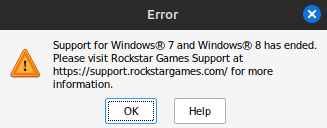
Hi all, I installed GTA 4 Complete Edition from Steam. The first time I tried playing after installation it worked flawlessly but has been giving me this error ever since. I have tried uninstalling and reinstalling and I have tried using a different Proton version only to get the same error again. I am on Linux Mint 21.3 Cinnamon with 13th Gen i7-3700K, RTX3080 Ti and 32 GB RAM. I haven't been able to find any help on Proton DB, hoping somebody here might have some idea. And I apologize if this is no the right place for this post, please let me know where I should post it. Thanks!
166
4
submitted 2 years ago by tyrant@lemmy.world to c/linuxmint@lemmy.ml

cross-posted from: https://lemmy.world/post/18656931

Coming over from windows again. I've got pretty much everything figured out. I even got a VM going with my CAD software so I don't need to switch between Windows! I was super proud of myself on that one. The last thing I'm having trouble with....

I use pdfxchange for my PDF editor. It works great in wine but they don't have a specific Linux release. (If there is a good PDF editor that is Linux native let me know, I need good Mark up and dimensioning tools that can scale off of the drawings). I'm trying to set it to open PDFs by default but can't figure it out. Does someone have a good (easy) way to do it?

167
6

Mine was working fine until I pulled the trigger on that update and rebooted. No bueno since then.

Asus Intel laptop with Nvidia 1650ti

168
2
submitted 2 years ago* (last edited 2 years ago) by andrewta@lemmy.world to c/linuxmint@lemmy.ml

I think this would do it

https://github.com/the-allanc/minty-color-titles

It says to put it into the .config/gtk-3.0 folder

But I can’t find a .config folder. I found an /etc/gtk-3.0 folder.

Would that directory work?

Is there a better way to change the title bar color?

169
9
submitted 2 years ago* (last edited 2 years ago) by julianh@lemm.ee to c/linuxmint@lemmy.ml

I've used my switch pro a lot for games on my pc, but after updating to 22 it no longer works, and I have no clue why. It connects and shows the player count lights, but no blue light and no controller detected by any software. lsusb shows the device and udemadm monitor shows a bunch of changes.

Sometimes I can get it to connect by connecting with bluetooth, then quickly plugging it in, which makes me think that it's an issue with udev rules? It won't connect with bluetooth alone though.

Is anyone else experiencing this or have an idea on how to solve it?

EDIT: FIXED! The issue was that I had joycond installed at one point, and the upgrade removed it (since its not needed since the kernel has support now). I just went in /lib/udev/rules.d and deleted any files with joycond in the name (there were 2).

170
10
submitted 2 years ago* (last edited 2 years ago) by Buelldozer@lemmy.today to c/linuxmint@lemmy.ml

One of my computers is an HP Elitebook X360 1040 G8 (convertible) and I'm happy to report that in Laptop Mode both LM21 and LM22 work perfectly. There's full control of the normal hardware including the touch screen, good performance, and good battery life.

With a couple of exceptions Mint also handles the shift to tablet mode pretty damn well. The keyboard and trackpad are disabled, the keyboard backlight shuts off, and the screen easily changes orientation with rotation.

The exceptions though are so fundamental to touch screen use in general though that I feel like I must be missing something?!

First and foremost is an on screen keyboard. I know it can be enabled under accessibility settings but when I do that it splashes up a keyboard that permanently fills half the screen. If I close the keyboard window it goes away but I can't find a way to get it to come back except to unfold the machine and re-enable it again.

It may not be possible to make it launch predicatively, although Gnome itself does. but why isn't there an icon at the top or bottom of the screen that I can tap to bring it back on demand?

The second one is scrolling, especially in Firefox. I know that Grab and Drag is possible because you can do it with the regular Firefox scroll bar but the scroll bar can be difficult to get on because of it's size and even then the scrolling action is backwards of both iOS and Android. This should be fixable be enabling gestures but surprisingly gestures don't have any assignable scroll functionality.

I'm really confused by these two issues. They seem so fundamental to how a touchscreen is used, especially the on screen keyboard, that it seems impossible they weren't addressed year ago. It's far more probably that I'm missing something obvious, but what?

171
5

I've had at least one computer with regular Mint + Cinnamon installed since V19 and it's always worked well for me. I somehow only learned about LMDE last month and since I've previously run Debian I figured I'd give it a shot.

I took the drive with my LM22 installation out and installed a brand new 1TB NVME, put LMDE "Faye" on it and YIKES.

I'd forgotten how "raw" regular Debian is in nearly everything from Grub to package management and even Cinnamon is somehow less sharp and sort of lackluster on LMDE.

The first boot up went okay but trying to swap the nouveau drivers for the Nvidia drivers did not go well at all and somehow ended up with all the fonts and icons broken.

I couldn't figure out how to fix it and decided to simply re-install LMDE from scratch, no big deal.

On the 2nd install I started getting AER errors on boot and every time I rebooted I got more of them. At one point the DE locked up entirely and I had to manually power cycle the machine. I couldn't get to the desktop after because of an endless string of AER errors.

In between reboots, while I could still get into the desktop, I was installing updates and while that process was pretty much the same as regular Mint it was also slower, even after changing over to the fastest repositories available. The update manager also didn't work as well. For instance the first update run said it was complete and wanted a reboot but before I could do that the update manager automatically ran again and it showed me all the updates it had just installed as needing installed again. WTF?

After frustrations with the Nvidia drivers, the weirdness of updating, broken desktop environment, and the AER errors I decided to see what would happen if I installed regular LM22.

With LM22 on that exact same hardware, including the new NVME, everything works perfectly. No errors, Nvidia drivers installed without issue, updates worked as expected and Cinnamon looks and behaves just like you'd expect.

Swapped out the NVME for the original drive that had LM22 on it and it too works just like I'd expect.

I'm not running weird-o hardware either; it's a Gigabyte motherboard and an Intel i5 10700k with 32G of RAM and an Nvidia 2060. No overclocking or performance tweaks.

I have no idea what I did wrong, if anything, or why LMDE seems to hate my hardware but for me on that system LMDE is not at parity with regular Linux Mint.

172
3
submitted 2 years ago* (last edited 2 years ago) by gpstarman@lemmy.today to c/linuxmint@lemmy.ml

I want to copy (not move) my Timeshift Snapshots (Rsync) from my existing drive to another drive. Both drives are ext4. As far as I searched I am not able to find any viable results.

If not possible, just why?


Solved

https://www.cyberciti.biz/faq/linux-unix-apple-osx-bsd-rsync-copy-hard-links/

TLDR

sudo rsync -az -H --delete --numeric-ids /path/to/timeshift path/to/destination/

Where,

-a : Archive mode (i.e. recurse into directories, and preserve symlinks, file permissions, file modification times, file group, file owner, device files & special files)

-z : Compress file data during the transfer

H : Preserve hard links (i.e. copy hard links as hard links)

--delete : Delete extraneous files from the receiving side (ones that aren't on the sending side), but only for the directories that are being synchronized i.e. keep exact replica of your /path/to/timeshift directory.

--numeric-ids : Transfer numeric group and user IDs rather than using user and group names and mapping them at both ends.

--progress : Show progress during transfer.

--log-file="/var/log/my-rsync-script.log" : Log what rsync command is doing to the /var/log/my-rsync-script.log file.


Thanks to @skullgiver@popplesburger.hilciferous.nl

Original Comment: https://lemmy.world/comment/11611743

173
21
submitted 2 years ago* (last edited 2 years ago) by andrewta@lemmy.world to c/linuxmint@lemmy.ml

I have two internal hard drives in my pc, one has windows 11 and one is for extra storage.

I hooked up an external USB drive to install Linux onto. During the install it says

Device for boot loader installation

And then it gives me a number of options

/dev/nvme0n1 (this I think is what my windows 10 is at)

/dev/nvme0n1p1

/dev/nvme0n1p3

/dev/nvme0n1p4

/dev/sda ATA WDC WD10EZEX-00W (1.0 TB) Ii think this is the other internal drive

/dev/sda2

/dev/sdb WD easystore 2647 (1.0 TB)

/dev/sdb1

I think the easystore is my external drive. The problem is they are both 1T in size and both western digital.

How do I know which is which?

Just above where it says "device for boot loader installation" it shows

If I try to click on /dev/sdb I can't click on install now.

On the basis that I should be trying to install in /dev/sdb what am I doing wrong to actually start the install process?

Yeah I'm new to Linux. I need help to do it right and not nuke my windows install

174
8

Hi there, I started using Linux Mint Cinnamon a few days ago and am currently setting up my workspace, that includes software I can't find through the integrated Software Manager

My biggest issue is that I don't understand how to determine if software is compatible with Mint. Often devs declare their product to be compatible with ubuntu. Since Linux Mint is based on ubuntu, does that make the software automatically compatible?

175
32
submitted 2 years ago by mr_MADAFAKA@lemmy.ml to c/linuxmint@lemmy.ml
view more: ‹ prev next ›

Linux Mint

3665 readers
3 users here now

Linux Mint is a free Linux-based operating system designed for use on desktop and laptop computers.

Want to see the latest news from the blog? Set the Firefox homepage to:

linuxmint.com/start/

where is a current or past release. Here's an example using release 21.1 'Vera':

https://linuxmint.com/start/vera/

founded 5 years ago
MODERATORS