251
12

I have gotten Wake On LAN (WOL) setup and working. However my machine is a Ubuntu machine using full disk LUKS encryption which means when booting it up, it requires a password/passphrase to unlock the machine before it boots into Ubuntu. The WOL systemD service I created will always make sure WOl is enabled for the next time the machine reboots, however if I reboot the machine and fail to unlock the device on the full disk encryption menu and the machine shut down, WOL will not be enabled which means WOL is not going to work to turn on the machine again.

Is there a way to enable WOL on the system full disk LUKs encryption lock screen?

252
5
submitted 2 years ago* (last edited 2 years ago) by 1_4M_N008@programming.dev to c/linux4noobs@programming.dev

Hey guys, i a am using ParrotOS and trying to install virtualbox from .deb package and i got the following warning

dpkg: dependency problems prevent configuration of virtualbox-7.0:
 virtualbox-7.0 depends on libc6 (>= 2.34); however:
  Version of libc6:amd64 on system is 2.31-13+deb11u6.
 virtualbox-7.0 depends on libssl3 (>= 3.0.0~~alpha1); however:
  Package libssl3 is not installed.
 virtualbox-7.0 depends on libstdc++6 (>= 12); however:
  Version of libstdc++6:amd64 on system is 11.2.0-18really16parrot1.
 virtualbox-7.0 depends on libvpx7 (>= 1.10.0); however:
  Package libvpx7 is not installed.

but it seems like ParrotOS repo outdated so i add http://archive.ubuntu.com jammy main universe to /etc/apt/sources.list update repo list apt-get update and then obtain libc6 package information

apt-cache policy libc6
libc6:
  Installed: 2.31-13+deb11u7
  Candidate: 2.31-13+deb11u7
  Version table:
     2.35-0ubuntu3 50
         50 http://archive.ubuntu.com/ubuntu jammy/main amd64 Packages
 *** 2.31-13+deb11u7 600
        600 https://deb.parrot.sh/parrot lts/main amd64 Packages
        600 https://deb.parrot.sh/parrot parrot/main amd64 Packages
        600 https://deb.parrot.sh/direct/parrot parrot-security/main amd64 Packages
        100 /var/lib/dpkg/status

then install libc6 via sudo apt-get install libc6=2.35-0ubuntu3 BUT i got

Reading package lists... Done
Building dependency tree... Done
Reading state information... Done
The following packages were automatically installed and are no longer required:
  afl++-doc docbook-to-man greenbone-security-assistant gtk-doc-tools gvmd-common hashcat-data intltool libapache2-mod-php libapache2-mod-php7.4
  libc-devtools libclang-cpp11 libclang-cpp9 libclang1-11 libcrypt-dev libfakeroot libffi-dev libgc1 libgvm21 libhiredis0.14 libllvm9 libltdl-dev liblzf1
  libmicrohttpd12 libnsl-dev libobjc-10-dev libobjc4 libomp-11-dev libomp5-11 libpfm4 libpocl2-common libradcli4 libtirpc-dev libucl1 libz3-dev llvm-9
  llvm-9-runtime llvm-9-tools openvas-scanner oracle-instantclient-basic ospd-openvas php-common php7.4-cli php7.4-common php7.4-json php7.4-opcache
  php7.4-readline postgresql-common python3-defusedxml python3-qrcode python3-terminaltables redis-server redis-tools sysstat upx-ucl xsltproc
Use 'sudo apt autoremove' to remove them.
The following additional packages will be installed:
  libncurses6 libncursesw6 libtinfo6
Suggested packages:
  glibc-doc locales
Recommended packages:
  libnss-nis libnss-nisplus
The following packages will be REMOVED:
  afl afl++ afl++-clang armitage bluelog build-essential clang clang-11 clang-9 commix fakeroot g++ g++-10 gsad gvm gvm-tools gvmd hashcat lib32gcc-s1
  lib32stdc++6 libbluetooth-dev libc-bin libc-dev-bin libc6-dev libc6-i386 libclang-common-11-dev libclang-common-9-dev libexpat1-dev libncurses-dev
  libpocl2 libpython3-dev libpython3.9-dev libstdc++-10-dev libtinfo-dev libtool llvm-9-dev locales mate-common metasploit-framework pocl-opencl-icd
  postgresql postgresql-13 python3-dev python3-gvm python3.9-dev set unicorn-magic zlib1g-dev
The following packages will be upgraded:
  libc6 libncurses6 libncursesw6 libtinfo6
WARNING: The following essential packages will be removed.
This should NOT be done unless you know exactly what you are doing!
  libc-bin
4 upgraded, 0 newly installed, 48 to remove and 180 not upgraded.
Need to get 3,812 kB of archives.
After this operation, 1,122 MB disk space will be freed.
You are about to do something potentially harmful.
To continue type in the phrase 'Yes, do as I say!'

What should i do?

Edit: format command output

253
5
submitted 2 years ago* (last edited 2 years ago) by CorrodedCranium@leminal.space to c/linux4noobs@programming.dev

I ran yay -Syu and everything went well but electron25 has taken over 10 hours to update. Is there anything I could have done to speed things up?

Solution: I checked AUR and other people were commenting about similar issues. I swapped out the package for the -bin version.

254
8
submitted 2 years ago* (last edited 2 years ago) by governorkeagan@lemdro.id to c/linux4noobs@programming.dev

Is it not possible to run Fedora Silverblue in live boot like other distros? I wanted to test it on my laptop before installing.

The laptop currently runs ZorinOS.

Edit: I downloaded the ISO from the Fedora website - here. When I try booting from the USB it only gives me the option for installing it.

255
21
venting (lemmy.today)

complete beginner so dont judge me but few days ago been trying to get more into linux so i installed arch. just today i deleted a separate partition on my disk and i couldnt access arch anymore, it wasnt showing on the bios. so i tried installing arch again using archinstall and it unmounted all the partitions on my disk.

is everything just gone now? i feel dumber and dumber as i write this because i just dont know what to do.

256
17

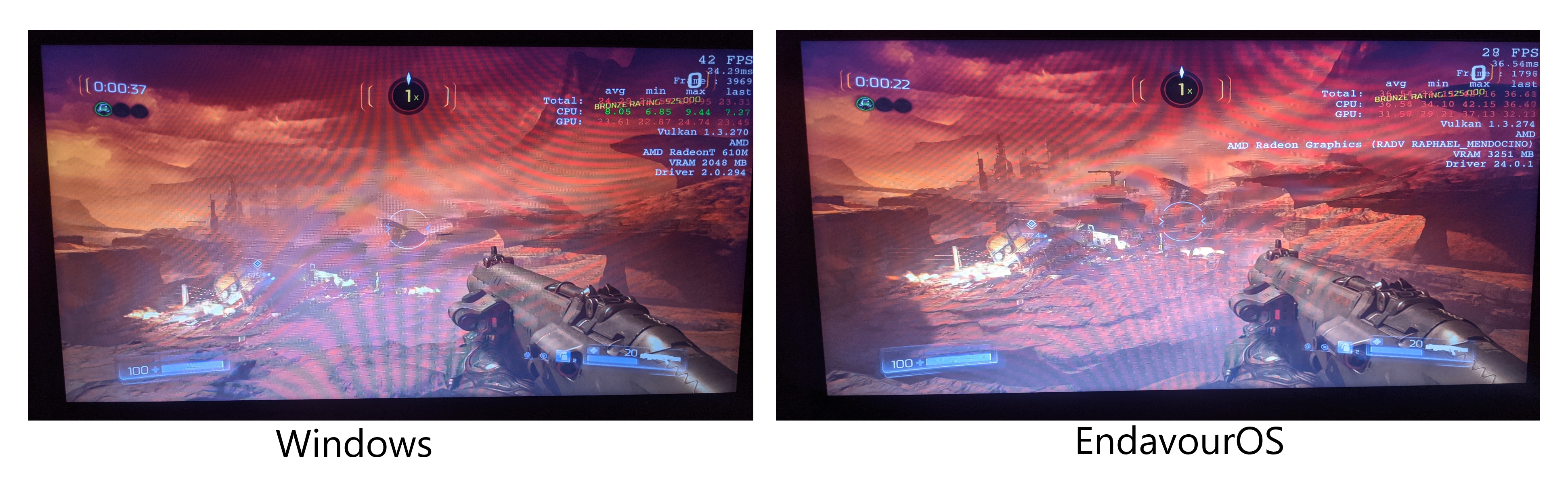
After 3 days I finally got doom running but it's not running very well (both on high setting 720p), not just doom I only got half the fps compared to windows on every games I tried, I'm so confused right now and I don't know what to do. I pretty new to Linux any help is appreciated, this is hardware I'm running on: AMD Ryzen 3 7320u, Radeon 610m, Nvme, Latest Wine and Endeavors OS with vulkan
257
16
submitted 2 years ago* (last edited 2 years ago) by Xirup@lemmy.dbzer0.com to c/linux4noobs@programming.dev

I wish to change the default Nautilus file dialog that Firefox uses, to Dolphin (my main file manager) but I cannot find any solution. Every single time I download an image, Nautilus is opened instead of Dolphin.

I tried adding GTK_USE_PORTAL=1 to my env variables, and It didn't work, then I tried changing mimetype and also did not work, I also tried modifying the xdg-portal (sorry if I'm wrong) to use xdg-desktop-portal-kde instead, but I cannot accomplish this since I didn't understand at all the Arch wiki and IIRC some files aren't exactly where the Arch wiki was pointing them.

As a last attempt, I open about:config in Firefox and search for widget.use-xdg-desktop-portal and set it to True, and still I keep having that old Nautilus as my file picker in Firefox, and this last thing usually worked well for me in Plasma.

Edit: I just restarted my pc and now randomly seems that Dolphin it's the file dialog for Firefox, I don't have a single clue how this happen.

258
12
submitted 2 years ago* (last edited 2 years ago) by andnekon@programming.dev to c/linux4noobs@programming.dev

Hello, everyone. Recently I finally decided to update my system, and right after the update ran into a problem: before update baobab showed ~22 GB avaliable space, and after the update it went down to around 8.

Here's some info, that might be relevant:

df output:

Filesystem     1K-blocks     Used Available Use% Mounted on
tmpfs             788700     1976    786724   1% /run
/dev/nvme0n1p8  53050368 48246568   4054792  93% /
tmpfs            3943496        0   3943496   0% /dev/shm
tmpfs               5120        4      5116   1% /run/lock
/dev/nvme0n1p8  53050368 48246568   4054792  93% /home
/dev/nvme0n1p7    998060   133944    795304  15% /boot
/dev/nvme0n1p1    364544    89768    274776  25% /boot/efi
tmpfs             788696      104    788592   1% /run/user/1000

du -h / shows 23G, du -h /home — 13G. Overall I have 54.3G disk space, so (23+13)/54 doesn't add up to 93%

sudo lsof | grep deleted | wc -l shows 8433 deleted files that are still in use.

I also tried booting with liveUSB and running 'check' on partition via GParted.

I did some research online:

I tried some methods to locate what consumes all the space, but couldn't figure it out. Also, the problem seems to be getting worse (right now baobab shows only ~5GB avaliable space). Can you help me find the source of the problem (and ideally also help me solve it :) )?

259
5

I really wanna ditch windows so bad but last time I tried Linux I got issues with gpu driver and I'm wondering if this laptop has a good Linux support

260
15
submitted 2 years ago* (last edited 2 years ago) by Xirup@lemmy.dbzer0.com to c/linux4noobs@programming.dev

I've been using Linux for the past 5 years, and recently I change from DE to WM (i3) which change it my whole workflow. Now I use a lot more the command line to do even simple things.

Recently I note that some relatives called me 'hacker' and I find that kinda funny, may be because I'm so accustomed to the terminal and to i3 that I don't notice that "it looks like a hacker thing".

261
11

I have a Lenovo Thinkpad x140e (AMD A4-5000M 1.5GHz 2MB L2 Cache Quad-core, 4GB DDR3) that I am currently dual booting with Mint and Windows 8. Mint feels sluggish compared to Win8.

I am not doing much with it, I need to run the Spotify app, and a webpage for hosting game tournaments. I am using the HDMI out on the laptop to a 4x4 Matrix.

I am looking for suggestions for a lightweight as possible distro.

262
8
263
11

I recently started using i3 (my first WM), and I used to use Plasma. In Plasma, when Spotify was opened, I just went to my system tray and there was a Spotify icon, which if I right clicked it, it let me close Spotify to system tray.

In i3 the only tray icons are the programs that are actually in the tray (Steam, e.g), so I cannot "close it to tray" as in Plasma.

264
17
submitted 2 years ago* (last edited 2 years ago) by trymeout@lemmy.world to c/linux4noobs@programming.dev

I am looking for a GUI text editor on Linux with a GUI which will allow me to connect to other machines via SSH and edit text files on these machines.

Is there such a thing or is there another way to do this with an encrypted connection?

265
16
submitted 2 years ago* (last edited 2 years ago) by Confused_Emus@lemmy.world to c/linux4noobs@programming.dev

SOLVED: Installed GloriousEggroll custom Proton. For Talos, also had to set launch options (PROTON_ENABLE_NVAPI=1 PROTON_LOG=1 %command%) or else I'd just get a black screen. First runs of games take a bit to get loaded, but launch without issue on subsequent runs.

I'm a recent convert to Linux - currently running Mint 21.2. I don't have a huge Steam library and thankfully most of the handful of games I play have worked fine - Deep Rock, Lethal Company, Sea of Thieves, Elite Dangerous (although that one is through Epic, thanks Heroic Launcher).

Two others that I've tried so far - Astroneer and Talos Principle II - don't seem to want to get started. When I hit play on either of those in Steam, it just stalls at "Launching..." I can cancel the launching and it'll go back to the Play button, but at this point Steam won't launch anything else. When I try to exit steam, the main window closes but its icon is still in the system tray icons. At this point, I have to kill the steam tasks before I can get it to re-open.

Since I'm seeing similar behavior for two different games, I'm guessing it might have something to do with the Proton config? I don't know much about it other than it being the main compatibility layer that gets the games running on Linux. In my Steam compatibility settings, I've got Steam Play enabled for supported and all other titles, and I've got "Run other titles with" set to Proton Experimental. I've seen that you can set the Proton version on a per-game basis as well. If that's the issue, is it just trial-and-error figuring out which version I need to use with each game?

266
14

Hi all,

I have recently installed Debian 12, KDE Plasma on my desktop pc, coming from windows 10.

I haven't yet messed with any drivers, everything seemed to run just fine. Until i noticed that after 1 or more hours just browsing or watching a streaming video, my desktop pc starts to rattle as if it is suddenly hard at work, the mouse cursor becomes unresponsive, and a minute later it doesn't move at all and the only thing left is to shut down with the power button.

So, i'm pretty sure nothing is suddenly wrong with fans or CPU temperature or whatnot, but maybe a Nvidia driver should be installed? Can i just follow Debians advice here?

Do you need additional info?

267
8

I have installed ClamAV to scan for viruses. It has 2 commands for scanning: these are clamscan and clamdscan. I use clamdscan because it is faster.

However, clamdscan cannot scan within home directories, or any directory it does not have permissions for, even when running as root. clamscan does not have this problem.

268
10
submitted 2 years ago* (last edited 2 years ago) by governorkeagan@lemdro.id to c/linux4noobs@programming.dev

I've written a small bash script to help with updating various packages/dependencies on my machine (Pop!_OS) but it doesn't seem to be working correctly for flatpak. If I run flatpak update in the terminal it will show that I have updates, but when running the script there aren't any updates.

The Script:

#!/bin/bash

# Update package list
sudo apt update -y

# Upgrade the packages and dependencies
sudo apt upgrade -y

# Remove unnecessary packages and dependencies
sudo apt autoremove -y

# Clean package cache
sudo apt clean -y

# Update Flatpak
sudo flatpak update -y

# Update firmware
sudo fwupdmgr update -y

echo "All updates and upgrades have completed sucessfully!"

EDIT: Running flatpak update -y without sudo fixes the issue.

269
18

I have been trying some of the immutable linux OSes because from what I understand they are more modern and feature better security and reliability. What I have found so far is shocking. Half of these don't support my laptop (probably because it's nvidia optimus). Some I tried like guix were very difficult to install, configure, and use with sprase documentation. Good luck trying to use KDE, wayland, or pipewire for example. BlendOS was notably better and could at least run on my laptop but chocked with nvidia driver issues.

I have switched to pop os on my laptop for now but looking at alternatives and what to install on my desktop.

270
5

I recently bought a IdeaPad i5 slim laptop, it works fine until I dual boot it with Linux, it cannot detect any kind of HDMI external display, I have tried 2 monitors and a TV and have no luck. And also there is weird behaviour where the Laptop will not use the external display while booting and only show the Lenovo splash screen on the laptop screen. And only switch to using the external display when Windows arrive to the sign in screen. This info maybe helpful

271
7

Welcome :)

I'm on Pop!_OS 22.04 LTS and up to date.

I shutdown my computer with no problems last night. Today I decrypted my drive with the on-screen prompt and it followed into a solid-grey background; My 3 accounts were not displaying. Rebooting has done nothing regarding the problem. The only notable thing I've done is install drawio and thunderbird from the pop shop.

Despite this issue, I was able to press [Enter] and input my password successfully. Everything else seems to be running hunky-dory.

I read through my syslogs while scritching my chin, but I honestly have no idea what to look for this time. I scanned through my entire post-boot log entry to no avail, but I'm also a... linux noob.

Help please q.q

272
5
273
5
submitted 2 years ago by Fizz to c/linux4noobs@programming.dev

I am trying to install this package on Nobara 38 but it only seems to be available on Deb and Ubuntu https://pkgs.org/download/libpcre3-dev

I've looked around and it seems I need to build the package from source but I cannot find the source or figure out how to build it. I downloaded libpcre3-dev_8.39-15_amd64.deb but im not sure what to do with the file.

I found the PCRE website but it doesn't have a libpcre3-dev https://www.pcre.org/

It might just be easier to do what I need to do in an ubuntu VM. Any advice on how to get this package installed would be appreciated.

274
12
submitted 2 years ago* (last edited 2 years ago) by 1_4M_N008@programming.dev to c/linux4noobs@programming.dev

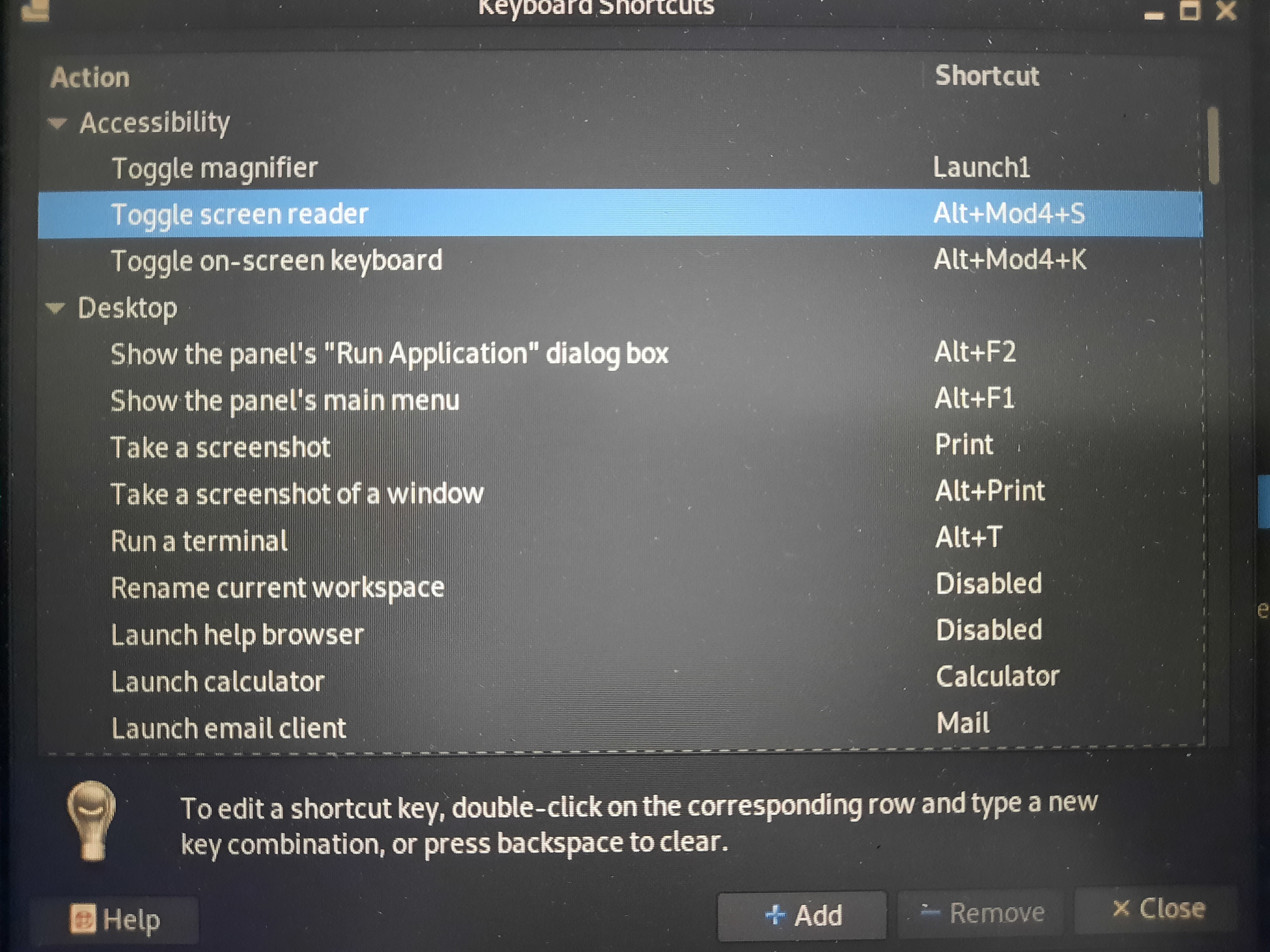
Hello guys, I'm using Parrot OS on an Asus G513. My problem is when I unintentionally adjust shortcuts (filled with Launcher1) automatically. However, this problem didn't catch my attention, when I used to boot live USB, after user space load any keystroke I press seems not working, from opening terminal to other shortcuts, however after like 5 min it will start to respond but each few key press screen brightness will get dimmer and dimmer, I thought it's problem with DE. now I just can press key combination (Alt + arrow) or (Mod + f) When I keep pressing return to delete, launcher1 eventually will get filled again before I realized it The only way I can adjust things now, via ssh

additional notes

  1. I can type in my password normally on the lock screen

  2. I can't log in via tty. Even before this incident, this is what will happen when I try to log in

hostname login: USER@^@^@^@^@^@^@^@^@^@^@^@^@^@^@^@^@^@^@^@^@^@^
password:@^@^@^@^@^@^@^@^@^@^@^@^@^@^@^@^@^@^@^@^@^@^@^@^@^@^@^@^@^@^@^@^@^@^@^@^@^@^@^@^@^@^@^@^
login inncorrect

tty will keep printing @^ combination until i hit Ctrl + c

Things I've tried: looking at /home/USER/.config/kglobalshortcutsrc, but there's no luck, and the last modification date is May 2

Edit: add shortcut photo

Update: I've managed to adjust the shortcut by holding "return + ctrl + alt + m" . But still, I can't figure out what causes rapid input.

thanks in advance.
275
5

I just found this. Helps me a great deal moving my files. :)

view more: ‹ prev next ›

linux4noobs

4408 readers
1 users here now

linux4noobs


Noob Friendly, Expert Enabling

Whether you're a seasoned pro or the noobiest of noobs, you've found the right place for Linux support and information. With a dedication to supporting free and open source software, this community aims to ensure Linux fits your needs and works for you. From troubleshooting to tutorials, practical tips, news and more, all aspects of Linux are warmly welcomed. Join a community of like-minded enthusiasts and professionals driving Linux's ongoing evolution.


Seeking Support?

Community Rules

founded 3 years ago
MODERATORS