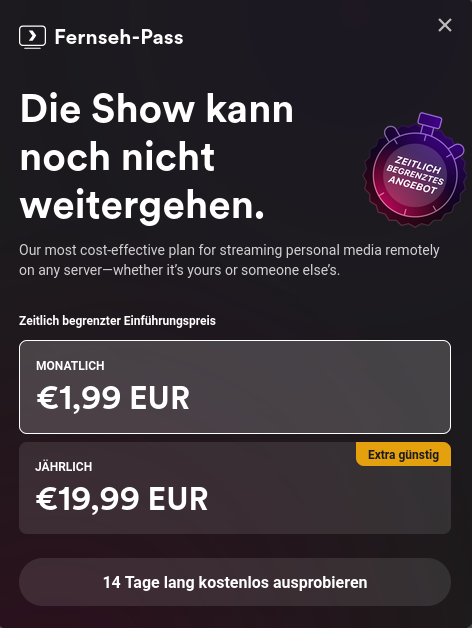
I tried testing a movie from my home server in plex through firefox and repeatedly got this message, even after reloading.
I knew that they had paywalled the apps on mobile and streaming from outside the network but now they have also blocked watching your own movies through your own hardware.
I do get the point that making software should be able to sustain people but I dont see the move of plex as a fair thing to do. Yes, they have made great software but taking your home server hostage feels like the wrong move.
Even a pop up that says "we need you to donate please" would have been fine. make it pop up before every movie, play donation ads before any movie but straight up disabling the app is kinda cruel.
Anyway, i have switched to jellyfin and it is insanely good. please give it a try. you can run it alongside plex with not issues (at least i had none) and compare the two.
In any case, good luck. Let me know if you need help.
FWIW:
Obviously not as trivial or seamless as Plex. Also I wouldn't try to complicate this setup by using docker for everything. But once its up you can basically host whatever you want on the WAN from your LAN.
Awesome, thanks for the tips!
What added security do you get by using a VPS besides obscuring your home IP? I can definitely see benifits to not leaking your home address, but otherwise the reverse proxy and wireguard tunnels don't actually add any increased security for the extra steps. You could just host a reverse proxy at home, and any flaws Jellyfin could have in their app would still be exposed.
I'm not knocking your solution, I'm just in a similar place and considering if I want to go through the extra hurdle for a VPS if I don't need one.
Obscuring home IP is the big one. You also don't have to fiddle with opening ports on your router and maybe getting ISP attention for hosting on a residential network. But really obscuring home IP address would work.
Dirt simplest solution is caddy on the same jellyfin server and port forward 443 and 80 on your router to that host. Hopefully letsencrypt will work without a domain but I'm not sure.
That's basically what I do right now except I do have a domain and my ISP doesn't restrict inbound ports like 443 so it works fine.
Just trying to sort out if I want the headache of a VPS if I don't need it (costs, maintenance, point of failure, etc).
Sounds like you don't need the VPS then. Add a subdomain to your home IP. Port forward 443 and 80 to the sever. Run caddy to route the subdomain to localhost:8096. You will also need to tell jellyfin to accept on the new domain.
So an additional 10 bucks a month….
5 actually because you can use minimal hardware. You can probably just port forward your router and run caddy on the same jellyfin server but then expose your home IP address.