I made a pause menu, but there seems to be a "dead square" in the middle of the screen, where it doesn't detect the mouse hovering. The deadzone seems fixed in size and place, moving the menu out of the center makes the problem stop. So, something invisible on top?
Video showing the problem - https://files.catbox.moe/92kr8z.mp4
How the node is set up
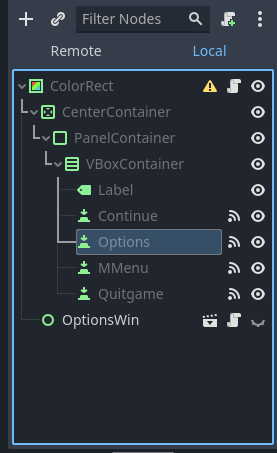
The "OptionsWin" opens a new UI element, but moving it around doesn't change the deadzone, even if none of its elements are anywhere near the original pause menu.
Any ideas on how to fix this without having to offset the pause menu?
EDIT: Fix is my comment below. Should've tested it as an isolate scene first, that led me to looking into the player node and finding the problem. Hopefully this will help someone else in the future.
Seems the default is actually PASS, which is what is set on both and I never noticed this parameter before. The
Force Pass Scroll Eventsis grayed out and checked, too.0px and outside the layout of the buttons, just in case ;)
Ah, I use godot 3.5, there the default is stop. Sounds like the options changed so your guess is as good as mine.
Came across that problem a second time. Fiddling with that Mouse parameter didn't do anything. No parameters did anything at all, period.
So, after further fiddling around, I've found two different ways to fix it: