[-] potemkinhr@lemmy.ml 14 points 2 years ago

Yep, used Skygrabber, you could filter out files depending on extensions, filenames etc and could narrow out what you wanted. Still had no real way of knowing what you'd end up with as you were effectively just passively listening on the satellite traffic. It was wild as you could fill out a 40 gig drive overnight without issues in the era where people were downloading a MP3 album for hours.

[-] potemkinhr@lemmy.ml 18 points 2 years ago

If you had real shitty internet back in the day (read 56k modem) and you liked to play russian roulette you would dump satellite traffic with a skystar2 DVB-S card. You never knew what you'd get realistically, found some true gems underneath mountains of coal in the day of (still) unfiltered internet.

[-] potemkinhr@lemmy.ml 9 points 2 years ago

To be frank I have used it since it started way back and it continues to have the best user experience among messengers. I myself don't use it for any crucial information but as a messenger with it's featureset it's second to none. When a better alternative pops up which will have a better UI and such an extensive featureset I will probably switch over

[-] potemkinhr@lemmy.ml 11 points 2 years ago

Yeah leave us alone

[-] potemkinhr@lemmy.ml 8 points 2 years ago

Who in their right mind celebrates kills on humans, in the end only regular people get harmed in any conflict, never the instigators from both sides

[-] potemkinhr@lemmy.ml 20 points 2 years ago

Now that you say it like that, why do purely singleplayer games need internet connectivity at all beside DRM and shovong DLCs down peoples throats

[-] potemkinhr@lemmy.ml 25 points 2 years ago

Care to ELI5 for us casuals who did not catch and are missing the obvious?

141
submitted 2 years ago by potemkinhr@lemmy.ml to c/antiwork@lemmy.ml
[-] potemkinhr@lemmy.ml 11 points 2 years ago

Ubisoft won't own my money too!

[-] potemkinhr@lemmy.ml 27 points 2 years ago

So it's the perfect sleeper PC that can be procured at work without anyone raising eyebrows because it's not in-your-face gamer aesthetic

[-] potemkinhr@lemmy.ml 9 points 2 years ago

I'a bit lazy so I just use precompiled apk's from some good soul from the internet and avoid the hassle alltogether. I roll with a release until something breaks, whick can go for quite some time and then manually just install the new build, works flawlessly. Here's the source I use

5
submitted 3 years ago by potemkinhr@lemmy.ml to c/apple@lemmy.ml

Just a heads up, I'm not an apple user, it never clicked with me but this might be the best spot to get an answer for my specific use case. What I do like was their old 3.5 mm jack earphones, but the playback controls never worked right on my android phone, probably because of the wiring layout or some DRM screwery. I've been looking to buy a second pair of them as my primary one has been confiscated by my better half, and I saw that they put out a USB-C version of those.

If any one has those headphones, can you test them out on an android device, or if you are sure can comment if the volume and playback controls work outside Apple's devices or are they locked to just their devices? I didn't see that info in any reviews and would know that bit of info before buying them blind.

1
submitted 3 years ago* (last edited 3 years ago) by potemkinhr@lemmy.ml to c/synology@feddit.de

I'm writing this post because I've gone through all the usual troubleshooting tips and I'm at an dead end.

I was cleaning up my DS216j and checked if there were any new updates and stumbled by accident that the NAS didn't auto update to the newest version as per the release notes for that model. It was stuck on 7.1.1-42962 Update 6 so I manually updated it to 7.2.1-69057 Update 1 as suggested by the notes and here the issue began.

I knew something was off as soon as I saw the app images corrupted
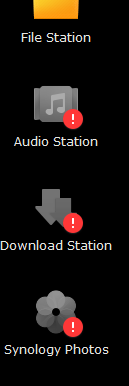
Going to the package center it can't connect to it and is throwing the following error:

Connection failed. Please check your network and time settings, or refer to this article for further information.

For pretty much any app it throws the following description:

DSM update can't do a version check and is failing as seen below
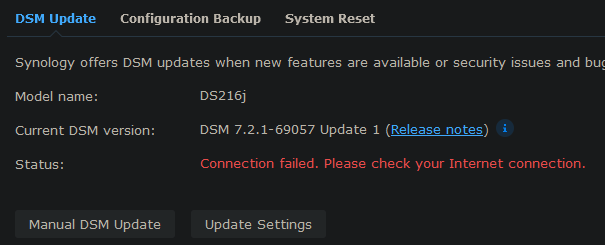
Synology service status page says everything's up. The device itself has access to the internet (NTP syncs time, Configuration backup is working) and I can curl webs sites from synology normally via SSH so I'm a bit puzzled.

EDIT: Upon digging a bit further on the Synology forums it appears I'm not the only one affected as there are other reports for pretty much the same thing

[-] potemkinhr@lemmy.ml 12 points 3 years ago

This one's hilarious, but that one's not gonna work for long as they will axe almost all non-government approved VPNs

[-] potemkinhr@lemmy.ml 12 points 3 years ago

Just to add a perspective from the other side of the fence, I have a gaming laptop running Windows 11 (yes I know) where this (or a very similar) issue has been plaguing Ryzen users for at least a year and a half. The issue is that TPM per se is not causing issues if turned on, but if BitLocker encryption is on it will cause occasional audio stutters and intermittent complete system halts. The only thing that reliably helps is completely turning off Bitlocker, the TPM chip can stay on and is of course needed for W11. OEMs and AMD have been digging their heads in the sand like ostritches and they have released the odd fix that does nothing to fix the underlying issue. I can't see MS doing anything to reverse course on requirements and am getting a bit fed up with their BS lately, browsing what distro might suit me best and might pull the trigger and finally switch...

view more: next ›

potemkinhr

0 post score
0 comment score
joined 3 years ago