[-] dan@upvote.au 1 points 10 hours ago

It depends on what you set your swappiness to, too. I think Linux distros still have pretty aggressive defaults that swap more than they probably need to.

[-] dan@upvote.au 3 points 10 hours ago

Yeah I shut down every day. It boots up fast enough that it's really not an issue.

[-] dan@upvote.au 2 points 15 hours ago* (last edited 15 hours ago)

People seeing what they can do with the data from Google's research paper. They just finished mapping out the entire brain and central nervous system of the male fruit fly. https://research.google/blog/a-connectomics-milestone-mapping-the-complete-male-fruit-fly-brain/

This is Google's summary about why they're doing this research:

The common fruit fly, Drosophila melanogaster, has been central to scientific research leading to multiple Nobel Prizes. Fruit flies have been a fundamental model organism in genetics, thanks to their stereotypical behavior and short life cycle, and promise to do the same for neuroscience. While the thoughts of this fruit-loving insect might seem far removed from human cognition, the brains of vastly different species share many similarities. Because mapping the 86 billion neurons in a human brain is not yet possible, scientists are using AI to map the brains of smaller organisms, like fruit flies. This will help us decipher how animal nervous systems perceive the world, react to stimuli, and how damaged neural pathways might one day be repaired.

[-] dan@upvote.au 3 points 15 hours ago

A friend recently went to a Weird Al concert and said he was very energetic the entire time. I'm jealous... I didn't even know he was touring.

[-] dan@upvote.au 3 points 15 hours ago

Even without hibernation, data in apps you have open will end up in the swap if your system is ever RAM-constrained.

[-] dan@upvote.au 4 points 16 hours ago

It's not as bad with LVM since LVM is more flexible. A swap file does still make it easier to change the size as needed though. If you need more swap, you can spin up a new swap file pretty much instantly while the system is running, without having to repartition. You can have both a swap partition and a swap file active at the same time though.

On systems where the data is encrypted, also encrypting the swap makes sense so I'm glad Debian does that.

[-] dan@upvote.au 2 points 20 hours ago

I don't use hibernation so I'm not sure.

[-] dan@upvote.au 10 points 20 hours ago

I've seen so many setups where people encrypt their data but forget to encrypt their swap.

[-] dan@upvote.au 43 points 20 hours ago* (last edited 20 hours ago)

This is solid research, and this evidence is really going to put Sony into an awkward position.

Companies shouldn't say you "own" a digital product if they can revoke the license at any time. Owning should mean something like when you buy a game from GOG - you get a non-revokable, DRM-free copy you can use indefinitely. Otherwise, you're really just leasing it.

It's mentioned on the wiki, but in California it's illegal to use words like "buy" or "purchase" on the checkout page for licenses like this. They have to show a clear notice that you don't actually own the product, which is why Steam added a banner on their checkout page.

[-] dan@upvote.au 27 points 21 hours ago

People still use swap partitions instead of swap files?

[-] dan@upvote.au 26 points 3 days ago* (last edited 3 days ago)

It's one of those programs that was initially very good and the developers genuinely cared about making it the best in the industry, but over time became a de-facto standard and therefore they don't need to actually make it good any more. People are still going to use it whether they put in effort or not, so they can enshittify as much as they want, to a point.

Same issue as Adobe, but they're starting to feel the consequences of that, with a bunch of companies offering cheaper or free alternatives to some Adobe products, that are commonly used in the industry now (things like DaVinci Resolve, Affinity suite, Photopea).

[-] dan@upvote.au 24 points 3 days ago* (last edited 3 days ago)

I use GreenCloudVPS for a bunch of things. They used to have VPSes starting at $15/year for 2GB RAM and 20GB disk, but their current budget deals are still good (starts at $25/year for 4GB RAM and 35GB disk). These are on older hardware (mostly AMD EPYC Rome Zen 2 systems, ~5 years old) which is why they haven't been affected by increased RAM and storage prices yet. https://greencloudvps.com/billing/store/budget-kvm-sale

They also have "premium" plans which are newer (AMD EPYC Milan Zen 3 or Genoa Zen 4, and PCIe 4.0 NVMe storage in RAID10): https://greencloudvps.com/billing/store/premium-kvm-sale

HostHatch is good too. Their regular pricing aims to compete with Hetzner, but in 13 locations worldwide. https://hosthatch.com/products. They do sometimes have sales on LowEndTalk with pricing similar to GreenCloud's "premium" plans.

RackNerd sometimes have good deals, although they've discontined quite a few of them recently. You can use https://racknerdtracker.com/ to see currently active deals. I still see a 2GB RAM + 35GB storage deal for $35/year for example.

I suspect all the very cheap ones (<$50/year) will eventually increase pricing. GreenCloud and HostHatch own all their hardware. Right now they use older hardware that's already reached break-even, but all hardware needs to be replaced eventually, and the replacement cost for things like enterprise SSDs is a lot higher than it was in the past.


If you want to stick to big names, OVHcloud and Hetzner both have pretty good VPS pricing. OVH runs theirs on very old hardware like Haswell (2014/2015 era) Xeon E5 CPUs which is the main reason why they have cheaper pricing that Hetzner.

There's also AWS Lightsail that's essentially Amazon's version of a VPS. Storage and data transfer are included in the monthly price, unlike EC2 where it costs extra. I'd only use it if you like AWS or want the comfort of using a very big company though - performance is notably worse than a provider like GreenCloudVPS or Hetzner.


I'm not affiliated with any of these companies. This is just my personal experience :)

103
submitted 3 months ago* (last edited 3 months ago) by dan@upvote.au to c/linux@lemmy.ml

I run dnstools.ws which lets you perform DNS lookups, pings, traceroutes, etc. from 25 locations around the world. Each location is powered by a VPS running Debian, running a C# service that's compiled to native code ahead-of-time using Native AOT. It uses ~60MB RAM.

Six of the the locations are powered by tiny "NAT VPSes" (native IPv6 with shared NAT IPv4) that only cost a few dollars a year, sponsored by various server providers. These usually have 256 MB RAM and 4-5 GB disk space.

This is great with OpenVZ and LXC. Since they're containers that share the kernel with the host, kernel memory doesn't count towards the container's memory limit. I'm using ~75 MB RAM on those systems: ~60MB for the DNSTools worker and ~15MB for everything else (sshd, systemd, cron, rsyslogd, and unattended-upgrades). Plenty of room left.

I also have a few KVM systems with 256 MB RAM. These are what I'm struggling with.

Debian 13 (Trixie) increased the minimum hardware requirements from 256 MB to 512 MB RAM. It seems like this is a hard requirement - When running on a system using 256 MB RAM, the installer complains about having too little RAM, and OOMs during the installation. Even with a successful installation (e.g. upgrading from bookworm to trixie), it kernel panics on boot: "System is deadlocked on memory".

I could try debootstrap to bootstrap a basic system, or Clonezilla to clone a working disk image over the network, but I think I'd hit the memory deadlock too.

Does Debian have smaller kernel images for VM environments, that use less RAM? Or should I just give up on Debian for this use case?

Does anyone have a recommendation for another distro I should use? I've been considering trying Alpine. C# does support compiling to use musl instead of glibc, so that's not an issue. I'm also not tightly-coupled to systemd and can get rid of it.

I can mount a custom ISO on the systems, so booting from an ISO isn't an issue.

Thanks!

Edit: Alpine looks very promising - no issue installing it and running my app on a 256MB VM. This is probably what I'll end up using.

11
submitted 2 years ago by dan@upvote.au to c/kde@lemmy.kde.social

I noticed that Spectacle has an option to upload to Imgur and Nextcloud. Is there a way to allow it to upload to an SFTP server?

Ideally I'd like for it to upload the file via SFTP then put the URL on my clipboard, which is what I do with ShareX on Windows.

16
submitted 2 years ago* (last edited 2 years ago) by dan@upvote.au to c/selfhosted@lemmy.world

I love Sentry, but it's very heavy. It runs close to 50 Docker containers, some of which use more than 1GB RAM each. I'm running it on a VPS with 10GB RAM and it barely fits on there. They used to say 8GB RAM is required but bumped it to 16GB RAM after I started using it.

It's built for large-scale deployments and has a nice scalable enterprise-ready design using things like Apache Kafka, but I just don't need that since all I'm using it for is tracking bugs in some relatively small C# and JavaScript projects, which may amount to a few hundred events per week if that. I don't use any of the fancier features in Sentry, like the live session recording / replay or the performance analytics.

I could move it to one of my 16GB or 24GB RAM systems, but instead I'm looking to evaluate some lighter-weight systems to replace it. What I need is:

  • Support for C# and JavaScript, including mapping stack traces to original source code using debug symbols for C# and source maps for JavaScript.
    • Ideally supports React component stack traces in JS.
  • Automatically group the same bugs together, if multiple people hit the same issue
    • See how many users are affected by a bug
  • Ignore particular errors
  • Mark a bug as "fixed in next release" and reopen it if it's logged again in a new release
  • Associate bugs with GitHub issues
  • Ideally supports login via OpenID Connect

Any suggestions?

Thanks!

8
submitted 2 years ago by dan@upvote.au to c/linux@lemmy.ml

On a small form factor PC with an i5-9500, Debian 12, 6.2.16 kernel, running Proxmox, powertop shows the following idle stats:

PowerTOP 2.14     Overview   Idle stats   Frequency stats   Device stats   Tunables   WakeUp


           Pkg(HW)  |            Core(HW) |            CPU(OS) 0
                    |                     | C0 active   2.8%
                    |                     | POLL        0.0%    0.0 ms
                    |                     | C1          1.1%    0.4 ms
C2 (pc2)    7.2%    |                     |
C3 (pc3)    5.5%    | C3 (cc3)    0.0%    | C3          0.1%    0.1 ms
C6 (pc6)    1.5%    | C6 (cc6)    1.9%    | C6          2.2%    0.6 ms
C7 (pc7)   75.2%    | C7 (cc7)   92.8%    | C7s         0.0%    0.0 ms
C8 (pc8)    0.0%    |                     | C8         21.5%    2.5 ms
C9 (pc9)    0.0%    |                     | C9          0.0%    0.0 ms
C10 (pc10)  0.0%    |                     |
                    |                     | C10        72.8%   12.5 ms
                    |                     | C1E         0.4%    0.2 ms

                    |            Core(HW) |            CPU(OS) 1
                    |                     | C0 active   1.4%
                    |                     | POLL        0.0%    0.0 ms
                    |                     | C1          0.7%    0.9 ms
                    |                     |
                    | C3 (cc3)    0.1%    | C3          0.1%    0.2 ms
                    | C6 (cc6)    1.0%    | C6          1.1%    0.8 ms
                    | C7 (cc7)   96.3%    | C7s         0.0%    0.0 ms
                    |                     | C8         18.9%    2.9 ms
                    |                     | C9          0.0%    0.0 ms
                    |                     |
                    |                     | C10        78.3%   24.8 ms
                    |                     | C1E         0.0%    0.0 ms
...

On a custom-built server with an i5-13500, Asus Pro WS W680M-ACE SE motherboard, Unraid (which uses Slackware), 6.1.38 kernel, it shows the following output:

PowerTOP 2.15     Overview   Idle stats   Frequency stats   Device stats   Tunables   WakeUp


           Pkg(HW)  |            Core(HW) |            CPU(OS) 0   CPU(OS) 1
                    |                     | C0 active   5.9%        0.9%
                    |                     | POLL        0.1%    0.0 ms  0.0%    0.0 ms
                    |                     | C1_ACPI    14.2%    0.2 ms  1.0%    0.1 ms
C2 (pc2)    0.0%    |                     | C2_ACPI    39.2%    0.8 ms 27.0%    0.9 ms
C3 (pc3)    0.0%    | C3 (cc3)    0.0%    | C3_ACPI    33.6%    1.2 ms 69.7%    3.0 ms
C6 (pc6)    0.0%    | C6 (cc6)    1.1%    |
C7 (pc7)    0.0%    | C7 (cc7)    0.0%    |
C8 (pc8)    0.0%    |                     |
C9 (pc9)    0.0%    |                     |
C10 (pc10)  0.0%    |                     |

                    |            Core(HW) |            CPU(OS) 2   CPU(OS) 3
                    |                     | C0 active  10.4%        0.5%
                    |                     | POLL        0.0%    0.0 ms  0.0%    0.0 ms
                    |                     | C1_ACPI    17.4%    0.2 ms  0.4%    0.2 ms
                    |                     | C2_ACPI    14.3%    0.8 ms  4.9%    0.6 ms
                    | C3 (cc3)    0.0%    | C3_ACPI    41.8%    5.4 ms 93.5%    5.5 ms
                    | C6 (cc6)    5.9%    |
                    | C7 (cc7)   26.7%    |
                    |                     |
                    |                     |
                    |                     |

                    |            Core(HW) |            CPU(OS) 4   CPU(OS) 5
                    |                     | C0 active  11.7%        0.2%
                    |                     | POLL        0.0%    0.1 ms  0.0%    0.0 ms
                    |                     | C1_ACPI    19.0%    0.1 ms  0.0%    0.0 ms
                    |                     | C2_ACPI    11.3%    0.7 ms  0.0%    0.0 ms
                    | C3 (cc3)    0.0%    | C3_ACPI    39.6%    7.7 ms 99.6%    7.0 ms
                    | C6 (cc6)    1.3%    |
                    | C7 (cc7)   25.4%    |
...

Both systems have C-states enabled in the BIOS.

I have a few questions I'm hoping someone can help with:

  • Why does the older system show more C-states in the right-most "CPU(OS)" column?
  • What does it mean when they're suffixed with "_ACPI" like in the output from the new system?
  • How do I debug the new system not hitting any CPU package C-states?

I can't find any documentation about this, neither on the man page nor on Intel's site (the official powertop URL https://01.org/powertop doesn't go anywhere useful any more).

Thanks!

25
submitted 2 years ago* (last edited 2 years ago) by dan@upvote.au to c/selfhosted@lemmy.world

Google Analytics is broken on a bunch of my sites thanks to the GA4 migration. Since I have to update everything anyways, I'm looking at the possibility of replacing Google Analytics with something I self-host that's more privacy-focused.

I've tried Plausible, Umami and Swetrix (the latter of which I like the most). They're all very lightweight and most are pretty efficient due to their use of a column-oriented database (Clickhouse) for storing the analytics data - makes way more sense than a row-oriented database like MySQL for this use case.

However, these systems are all cookie-less. This is usually fine, however one of my sites is commonly used in schools on their computers. Cookieless analytics works by tracking sessions based on IP address and user-agent, so in places like schools with one external IP and the same browser on every computer, it just looks like one user in the analytics. I'd like to know the actual number of users.

I'm looking for a similarly lightweight analytics system that does use cookies (first-party cookies only) to handle this particular use case. Does anyone know of one?

Thanks!

Edit: it doesn't have to actually be a cookie - just being able to explicitly specify a session ID instead of inferring one based on IP and user-agent would suffice.

14
submitted 3 years ago by dan@upvote.au to c/selfhosted@lemmy.world

I'm replacing an SFF PC (HP ProDesk 600 G5 SFF) I'm using as a server with a larger one that'll function as a server and a NAS, and all I want is a case that would have been commonplace 10-15 years ago:

  • Fits an ATX motherboard.
  • Fits at least 4-5 hard drives.
  • Is okay sitting on its side instead of upright (or even better, is built to be horizontal) since it'll be sitting on a wire shelving unit (replacing the SFF PC here: https://upvote.au/post/11946)
  • No glass side panel, since it'll be sitting horizontally.
  • Ideally space for a fan on the left panel

It seems like cases like this are hard to find these days. The two I see recommended are the Fractal Design Define R5 and the Cooler Master N400, both of which are quite old. The Streacom F12C was really nice but it's long gone now, having been discontinued many years ago.

Unfortunately I don't have enough depth for a full-depth rackmount server; I've got a very shallow rack just for networking equipment.

Does anyone have recommendations for any cases that fit these requirements?

My desktop PC has a Fractal Design Define R4 that I bought close to 10 years ago... I'm tempted to just buy a new case for it and repurpose the Define R4 for the server.

29
submitted 3 years ago by dan@upvote.au to c/selfhosted@lemmy.world

Sorry for the long post. tl;dr: I've already got a small home server and need more storage. Do I replace an existing server with one that has more hard drive bays, or do I get a separate NAS device?


I've got some storage VPSes "in the cloud":

  • 10TB disk / 2GB RAM with HostHatch in LA
  • 100GB NVMe / 16GB RAM with HostHatch in LA
  • 3.5TB disk / 2GB RAM with Servarica in Canada

The 10TB VPS has various files on it - offsite storage of alert clips from my cameras, photos, music (which I use with Plex on the NVMe VPS via NFS), other miscellaneous files (using Seafile), backups from all my other VPSes, etc. The 3.5TB one is for a backup of the most important files from that.

The issue I have with the VPSes is that since they're shared servers, there's limits in terms of how much CPU I can use. For example, I want to run PhotoStructure for all my photos, but it needs to analyze all the files initially. I limit Plex to maximum 50% of one CPU, but limiting things like PhotoStructure would make them way slower.

I've had these for a few years. I got them when I had an apartment with no space for a NAS, expensive power, and unreliable Comcast internet. Times change... Now I've got a house with space for home servers, solar panels so running a server is "free", and 10Gbps symmetric internet thanks to a local ISP, Sonic.

Currently, at home I've got one server: A HP ProDesk SFF PC with a Core i5-9500, 32GB RAM, 1TB NVMe, and a single 14TB WD Purple Pro drive. It records my security cameras (using Blue Iris) and runs home automation stuff (Home Assistant, etc). It pulls around 41 watts with its regular load: 3 VMs, ~12% CPU usage, constant ~34Mbps traffic from the security cameras, all being written to disk.

So, I want to move a lot of these files from the 10TB VPS into my house. 10TB is a good amount of space for me, maybe in RAID5 or whatever is recommended instead these days. I'd keep the 10TB VPS for offsite backups and camera alerts, and cancel the other two.

Trying to work out the best approach:

  1. Buy a NAS. Something like a QNAP TS-464 or Synology DS923+. Ideally 10GbE since my network and internet connection are both 10Gbps.
  2. Replace my current server with a bigger one. I'm happy with my current one; all I really need is something with more hard drive bays. The SFF PC only has a single drive bay, its motherboard only has a single 6Gbps SATA port, and the only PCIe slots are taken by a 10Gbps network adapter and a Google Coral TPU.
  3. Build a NAS PC and use it alongside my current server. TrueNAS seems interesting now that they have a Linux version (TrueNAS Scale). Unraid looks nice too.

Any thoughts? I'm leaning towards option 2 since it'll use less space and power compared to having two separate systems, but maybe I should keep security camera stuff separate? Not sure.

13
submitted 3 years ago* (last edited 3 years ago) by dan@upvote.au to c/networking@sh.itjust.works

I have a 10Gbps internet connection. On a system with a 10Gbps Ethernet card, I can get ~8Gbps down and ~6Gbps up:

I'd expect this to easily max out a 2.5Gbps network connection. However, while the upload is maxed (or close to it), I can only ever get ~1.0 to 1.5Gbps down:

Both tests were performed on the same system. The only difference is that the first one uses a TRENDnet 10Gbps PCIe network card (which uses an Aquantia AQC107 chipset) whereas the second one uses the onboard NIC on my motherboard (Intel I225-V chipset).

This is consistent across two devices that have 10Gbps ports and two devices that have 2.5Gbps ports.

I'm using an AdTran 622v ONT provided by my internet provider, a TP-Link ER8411 router, and a MikroTik CRS312-4C+8XG-RM switch. I'm using CAT6 cabling, except for the connection between the router and the switch which uses an SFP+ DAC cable.

I haven't been able to figure it out. The 'slower' speeds are still great, I just don't understand why it can't achieve more than 1.5Gbps down over a 2.5Gbps network connection.

Any ideas?

76
submitted 3 years ago* (last edited 3 years ago) by dan@upvote.au to c/selfhosted@lemmy.world

I couldn't find a "Home Networking" community, so this seemed like the best place to post :)

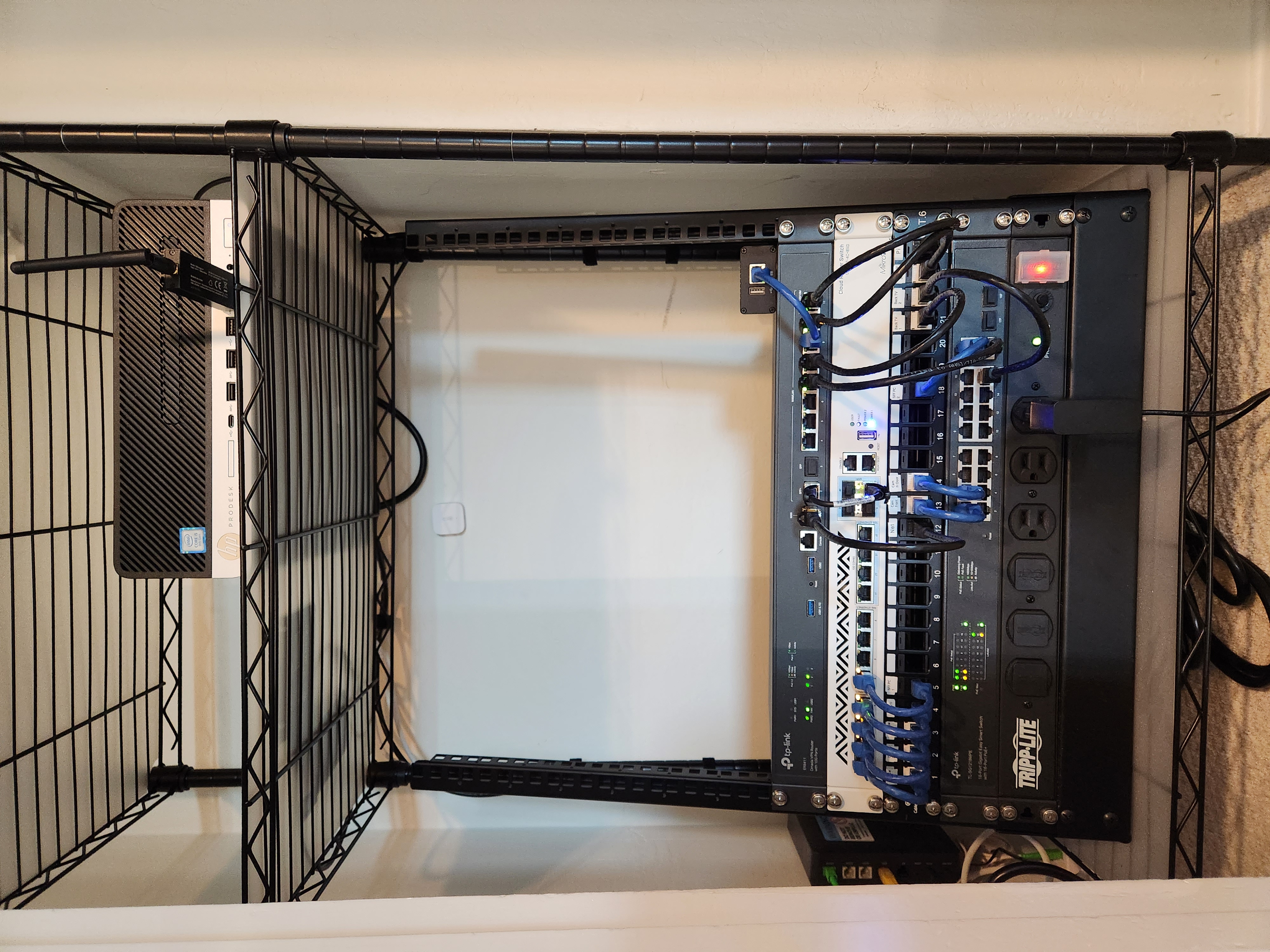
My house has this small closet in the hallway and thought it'd make a perfect place to put networking equipment. I got an electrician to install power outlets in it, ran some CAT6 myself (through the wall, down into the crawlspace, to several rooms), and now I finally have a proper networking setup that isn't just cables running across the floor.

The rack is a basic StarTech two-post rack (https://www.amazon.com/gp/product/B001U14MO8/) and the shelving unit is an AmazonBasics one that ended up perfectly fitting the space (https://www.amazon.com/gp/product/B09W2X5Y8F/).

In the rack, from top to bottom (prices in US dollars):

  • TP-Link ER8411 10Gbps router. My main complaint about it is that the eight 'RJ45' ports are all Gigabit, and there's only two 10Gbps ports (one SFP+ for WAN, and one SFP+ for LAN). It can definitely reach 10Gbps NAT throughput though. $350
  • Wiitek SFP+ to RJ45 module for connecting Sonic's ONT (which only has an RJ45 port), and 10Gtek SFP+ DAC cable to connect router to switch.
  • MikroTik CRS312-4C+8XG-RM managed switch (runs RouterOS). 12 x 10Gbps ports. I bought it online from Europe, so it ended up being ~$520 all-in, including shipping.
  • Cable Matters 24-port keystone patch panel.
  • TP-Link TL-SG1218MPE 16-port Gigabit PoE switch. 250 W PoE power budget. Used for security cameras - three cameras installed so far.
  • Tripp Lite 14 outlet PDU.

Other stuff:

  • AdTran 622v ONT provided by my internet provider (Sonic), mounted to the wall.
  • HP ProDesk 600 G5 SFF PC with Core i5-9500. Using it for a home server running Home Assistant, Blue Iris, Node-RED, Zigbee2MQTT, and a few other things. Bought it off eBay for $200.
    • Sonoff Zigbee dongle plugged in to the front USB port
  • (next to the PC) Raspberry Pi 4B with SATA SSD plugged in to it. Not doing anything at the moment, as I migrated everything to the PC.
  • (not pictured) Wireless access point is just a basic Netgear one I bought from Costco a few years ago. It's sitting on the top shelf. I'm going to replace it with a TP-Link Omada ceiling-mounted one once their wifi 7 access points have been released.

Speed test: https://www.speedtest.net/my-result/d/3740ce8b-bba5-486f-9aad-beb187bd1cdc

Edit: Sorry, I don't know why the image is rotated :/ The file looks fine on my computer.

view more: next ›

dan

0 post score
0 comment score
joined 3 years ago