The technology has "been there" for a while, it's trivial do setup what you're asking for, the issue is that games have anti cheat engines that will get triggered by the virtualization and ban you.
this post was submitted on 15 Jun 2024
98 points (95.4% liked)
Selfhosted
40347 readers
330 users here now
A place to share alternatives to popular online services that can be self-hosted without giving up privacy or locking you into a service you don't control.
Rules:
-
Be civil: we're here to support and learn from one another. Insults won't be tolerated. Flame wars are frowned upon.
-
No spam posting.
-
Posts have to be centered around self-hosting. There are other communities for discussing hardware or home computing. If it's not obvious why your post topic revolves around selfhosting, please include details to make it clear.
-
Don't duplicate the full text of your blog or github here. Just post the link for folks to click.
-
Submission headline should match the article title (don’t cherry-pick information from the title to fit your agenda).
-
No trolling.
Resources:
- selfh.st Newsletter and index of selfhosted software and apps
- awesome-selfhosted software
- awesome-sysadmin resources
- Self-Hosted Podcast from Jupiter Broadcasting
Any issues on the community? Report it using the report flag.
Questions? DM the mods!
founded 1 year ago
MODERATORS
Which games do that? Running pasthrough gpu on windows for destiny and halo at least gave me 0 issues for years
Anything using vanguard such as valorant and league of legends, battleye such as pubg, destiny 2, and rainbow 6 siege, and easy anti cheat such as fortnight blocks virtual machines. Vanguard is especially bad because it will not allow to run the game with Intel-VT/AMD-V enabled even if you are running bare metal as of its last update.
this just makes me wanna install bare-metal goody-2-shoes windows and cheat using a 5$ arduino
That’s weird destiny 2 has never given me issue, though I don’t play super frequently so maybe I’m just lucky
Vanguard is especially bad because it will not allow to run the game with Intel-VT/AMD-V enabled even if you are running bare metal as of its last update.
The Vanguard anti-cheat is incredibly invasive and something akin to malware, so that's not surprising.
I'm surprised, I was pretty sure anything with Battleye flat out rejected virtualization.
I thought Destiny used Battleye but I must be mistaken on one of these points.
load more comments
(2 replies)
I’ve been doing exactly that at home for a couple years now. First with Parsec, now Sunshine/Moonlight.
Host is Proxmox on Ryzen 5800x, 64gm RAM GPU is 2070 Super, with VGPU patched drivers from https://gitlab.com/polloloco/vgpu-proxmox
When I’m gaming I’ll dedicate the full 8Gb to my windows Vm, otherwise I split it in 2 or 4Gb chunks to Jellyfin or my home camera monitoring. 8gb can’t split very many ways, and most things require at least 2 to run.
Locally at home I can run 1440p 60fps rock solid over wifi on any device, from my phone/old laptop/apple tv/raspberry pi. Remote I can do 1080p60, but a bit more hit or miss depending on my network connection.
Experimenting with LLMs I’ve done through the same windows VM, or to a ubuntu dev VM. Works the same way. I’m thinking of transitioning my gaming VM to Linux too.
The amount of VRAM is the hard limitation to get past, the virtualization tech itself has been there for a while.
But to be perfectly honest……it really was just a “let’s see if I could do this” type task, direct GPU pass though is more straightforward and it’s not really worth splitting 8Gb these days. Unless you get a card with significantly more VRAM passthrough is much less work.
This is really amazing! In theory, can you can use 2gb with 4 different VMs?
Sure, but you’ll get diminishing returns most likely as consumer hardware doesn’t really have the resources to scale that way very well if all the VMs are running demanding apps simultaneously.
Even for something like 4 VMs that just do NVenc, there are limits for how many streams the GPU can do. I think there’s another patch that lets you raise that, but at some point you’ll run out of resources quick. Even powerful consumer gear isn’t really designed to be used by more than one user/app and it starts to show the more you virtualize and split those resources.
Hmm. I’m running a 3090 and 4090. Looks like vgpu is not possible yet for those cards.
Yeah unfortunately. 20xx is last generation supported so far via the patch, not sure if support for later cards is coming or not.
How does the vGPU compare to running it on the bare metal? Last I tried things were painful but technically usable.
I don’t see any performance differences with the vgpu actually. I have more performance bottlenecks with the CPU, and my RAM isn’t the fastest, so I think I’m more CPU limited. Benchmarks I have run that are GPU focused seem to show little to no difference from what the physical card would do.
load more comments
(2 replies)
I bought a cheap used Dell R710 on Facebook marketplace for like $100 or so, as well as an ups, rack, 10g switch, etc, from various other sellers. All told, I’ve got about $500 in my server setup.
Installed proxmox on it. It’s “free” if you don’t buy a license. You just have to put up with a little nag screen when you open the control panel but it still works 100%, much like winrar.
Works great.
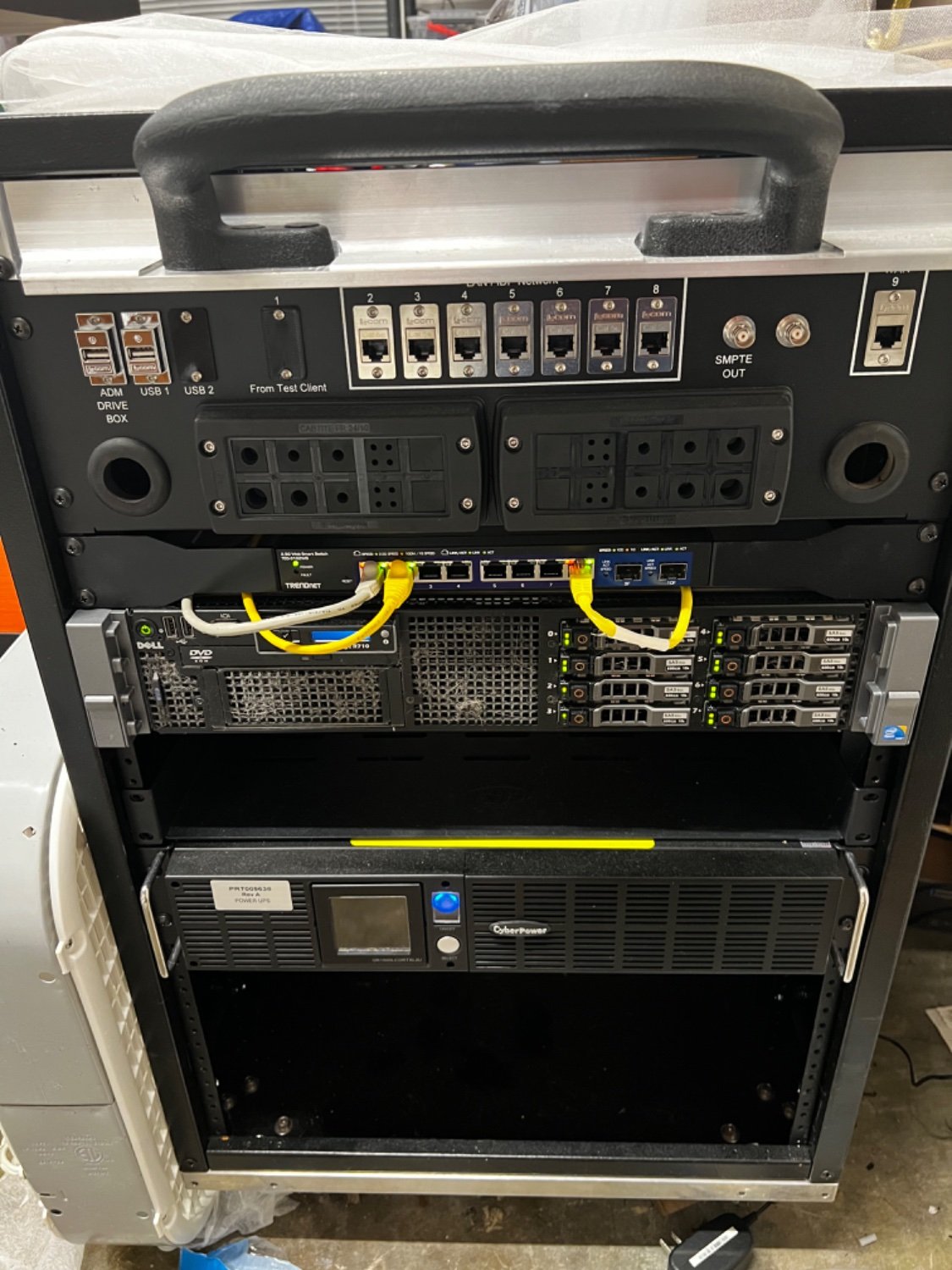
Edit: just realized this is in c/selfhosted AND I misunderstood the post. I’m gonna leave it here just on the off chance it’s useful to somebody, but I acknowledge it’s not what you’re looking for.
Btw just in case you aren't aware, the nag can be done away with. I don't have a link off the top of my head but it's out there.
load more comments
(1 replies)
I've also wanted to do this for a while, but there were always a few too many barriers to actually spin up the project. Here's just a brain dump of things I've seen recently.
vGPUs continue to be behind a license. But there is now vgpu_unlock.
L1T just showed off PCIe "fabric" from Liqid that can switch physical devices between machines.
Turning VMs on and off isn't as slick as either of the above, but that is doable today. You'll just have to build all the switching automation yourself. That could just be a shell script running QEMU/libvirt commands, at a minimum.
load more comments
(6 replies)
I know you asked about VMs, but fwiw there are GPU-capable containers now: https://docs.nvidia.com/datacenter/cloud-native/container-toolkit/latest/install-guide.html
Used one of these and the setup is as easy as it sounds. It can run Houdini, Stable Diffusion.
GPU passthrough has been pretty good for a while. The reason why Linus couldn't get it working reliably was because iirc, he tried to do it on windows... I've done it before with a single gpu and have very recently set it up again, now that I have a 2nd one and gotta say, it's pretty damn good...
How are you handling displays and keyboard/mouse? Also what VM software?
You're not really describing your use-case here. Are you just trying to run a server that does all your rendering for you so you can play games elsewhere? Yes, that's totally possible.
If you're trying to describe a business...no, it's not possible, scalable, or profitable.
I'm curious as to what your intentions are here though.
I have a workstation I use for video editing/vfx as well as gaming. Because of my work, I'm fortunate to have the latest high end GPUs and a 160" projector screen. I also have a few TVs in various rooms around the house.
Traditionally, if I want to watch something or play a video game, I have to go to the room with the jellyfin/plex/roku box to watch something and am limited to the work/gaming rig to play games. I can't run renders and game at the same time. Buying an entire new pc so I can do both is a massive waste of money. If I want to do a test screening of a video I'm working on to see how it displays on various devices, I have to transfer the file around to these devices. This is limiting and inefficient to me.
I want to be able to go to any screen in my house: my living room TV, my large projector in my studio room, my tablet, or even my phone and switch between:
- my workstation display running on a Window 10 VM
- my linux VM with youtube or jellyfin player I use as a daily driver
- a fedora or Windows VM dedicated to gaming, maybe SteamOS
- maybe a friend comes over for a LAN party and we both can game without having to set up a 2nd rig
- I want to host an LLM or stablediffusion server without having to buy a new GPU with enough VRAM to run SDXL
load more comments
(6 replies)
Everytime I’ve looked into it, it seemed like the technology just wasn’t there yet. I remember a few years ago Linus TT took a shot at it, but in the end suggested the technology (for non-commercial entities) just wasn’t in a comfortable spot yet.
I had a sever in my basement running proxmox ( actually ended up doing it all manually eventually ), with a windows gaming VM and handful of utility Linux servers in 2015? The only problem being Windows games using kernel level anti cheat.
I get it really comes down to GPU sharing and I think it’s doable on consumer GPUs now but I’m not sure about gaming. Honestly the tech has been here for a long time. But companies like NVIDIA held on forever to the GPU resource sharing features and kept it away from consumer cards.
I’m a bit older these days and have gone through many generations of hardware with a different setup. I keep two or more GFX cards on hand. Latest always goes to my workstation while last gen is thrown in my sever and used by all my docker containers. Then have an older Xeon with 24 bays that I use for storage.
You can use proxmox to do most of this. Currently my set will only pass-through the gpu to one VM. I have heard of splitting the power among VMs but I have not gone down that rabbit hole. If I want to play with llms I fire up that server, if I want to game, I shut that down and fire up my windows 10 vm.
In Proxmox they have VirGL-GPU and Virtio-GPU. They allow VMs to pass work to the GPU without being dedicated to one VM. I don't think gaming was the intended use case and don't know what kind of performance you would get. My uninformed guess is that it would not be great.
load more comments
(1 replies)
I currently have a setup exactly like this, with a threadripper 2950x, an RX 6600, and a 2070 super.
Let me know if you have any questions in the specifics, but its 100% possible
Best part of this setup is being able to connect to both via sunshine on many displays at once
I’m curious in a more in depth breakdown of your setup if you don’t mind. What is latency like and how are you handling switching?
I have a rack server in the garage with a gaming PC in it, 2 PSU's and the 2 GPU's mentioned, all running on Debian (which I soon plan to swap to nixos).
The AMD GPU's is passed through to a windows VM with 8 gigs or so of ram, for VR development in the garage usually, but sometimes is streamed as well.
The second Nvidia GPU goes to my linux machine on Ubuntu just for ease of patched nvidia drivers, a couple virtual monitors with an xconfig like this, and is my daily driver with 16 gigs of RAM.
Both use Virtio drivers for disk, network, and anything else I'm forgetting, Pcie passthrough via KVM/QEMU on the host.
I'd say the latency hangs around 5ms when streaming both at once, and never comes close to saturating the gigabit connection, but I'm sure some optimisations could be done somewhere along the line.
Clients run on anything from an Xbox series X to a random PC, hopefully soon an orange pi (worried about latency though).
When I have a workload requiring both GPU's I just keep 2 moonlight windows open and use the keybinds to unfocus the mouse then alt+tab to swap between them.
I don't have any complaints, although one time when my thermal setup was worse I left 2 copies Subnautica running for my wife and I to at Nitrox together, and it did start to drop in fps on the Linux machine once we picked it up after an hour or 2 running the games AFK.
Edit to add I'm mostly using this for gaming right now, but its handled everything (within reason) that I've tossed at it, but I'm planning on soon setting up this sometime soon also across a couple other PC's, but as of right now the VM's feel as if they're entirely distinct PC's from an external perspective
OK, but why?
Well, for fun and as a cool hobby project, I get that. That is enough to justify it, like any other crazy hobbyist project. Don't let me stop you.
But in the spirit of practicality and speaking hypothetically: Why set it up that way?
For self-hosting why not build a few standalone machines and run off that instead? The reason to do this large scale is optimizing resources so you can assign a smaller pool of hardware to users as they need it, right? For a home set of two or three users you'd probably notice the fluctuations in performance caused by sharing the resources on the gaming VMs and it would cost you the same or more than building a couple reasonable gaming systems and a home server/NAS for the rest. Way less, I bet, if you're smart about upgrades and hand-me-downs.
Yep this has been my hold up. It is mostly just a solution in search of a problem.
The best use case I have come up with is if you have an nice computer and an extra GPU laying around. You could turn the single computer into two workstation/gaming computers.
load more comments
(4 replies)
load more comments
(2 replies)
I've recently tried to do that using sunsine and different linux gaming distros and it was awful, the VM was working great for a few minutes and then suddenly crashes and I have to hard stop it.
All the people that I've seen talking about it on the internet are using Windows VMs so I guess that I'm doing something wrong or the only way to do it is through a Windows VM, which I'll not even try.
I run a gaming Linux VM on my server and it works fine.
load more comments
(4 replies)
Craft computing has been chasing this for several years now. His most recent attempt being the most successful one. https://m.youtube.com/watch?v=RvpAF77G8_8
load more comments
(1 replies)
I got stardew working on a local network and playing on the miyoo mini. It was cool for the novelty, but had terrible performance outside a local network. After only a couple of hops it's unplayable and will disconnect.
load more comments
(1 replies)
You should take a look at https://www.youtube.com/channel/UCp3yVOm6A55nx65STpm3tXQ he does have a serie about doing something like this and go in depth in it
load more comments
(2 replies)
As others have expressed- were already there. Understand though that the reason this hasn't caught on mainstream is the entire purpose of what you are asking is simple: it runs counter to the standards of commercial capitalism. We are talking about efficiency, self hosting, doing more with less, and cutting strings.
That said- understand that what you are undertaking is not dissimilar from building infrastructure in a company. You are building and expanding to meet your needs. Your needs are unique so there isn't a 'turn key' solution that will fit perfectly... so you need to try things and see what works.
As far as things you are talking about specifically: you are going to ultimately be dipping your toes into the virtualization world... so xcp-ng and proxmox are good choices. If you can get your hands on older copies and uh... source a key or two: esxi is also very beginner friendly but won't be able to upgrade thanks to their new pricing model. You seem like you are aware of the YouTube sphere so let me recommend 2GuysTech and the series on different hypervisors.
Once you decide on a hypervisor it's as 'simple' as building a PC to meet your needs. If you have one already I'd start there to get a feel for how much you can pull out of it to determine how much you may need. You can probably split up a single GPU or just pass it through (cost vs performance.). LLMs are power / resource hungry so that may require it's own GPU.
If power is cheap by you you can look into older server hardware but honestly this can be a messy space to dabble in (noise, heat, power costs.)
From there play with services that fit your needs.
It's very doable and there are some easier paths to take... certainly- but again the thing about homelabs is it's very custom. This is why the community (in general) is willing to help. We all have had to forge the same path.
None of the presented solutions cover the aspect of being in a different place than the rack, the same network is fine, but at a minimum a different room.
How do you deliver high resolution (e.g. 1440p, 144 fps) to multiple monitors with low latency over a network? I haven't seen anything like that accomplished without running fiber from the host.
Eventually, your thin client will need too much power anyway, making the costs rise a lot. It makes sense in an office where you have 500 seats and you can load balance resources.
If someone can show me a multi seat gaming server that has native remote performance (as in you drag windows around in 144 fps, not the standard artifacty high latency behavior of vnc) I'll eat a shoe.
Yep just ping time and latency make this a no go for a vast majority of us.
load more comments
(1 replies)
load more comments
(8 replies)
load more comments
(9 replies)
view more: next ›