33
30GB+ used on freash Arch install+KDE? Why?
(lemmy.ca)
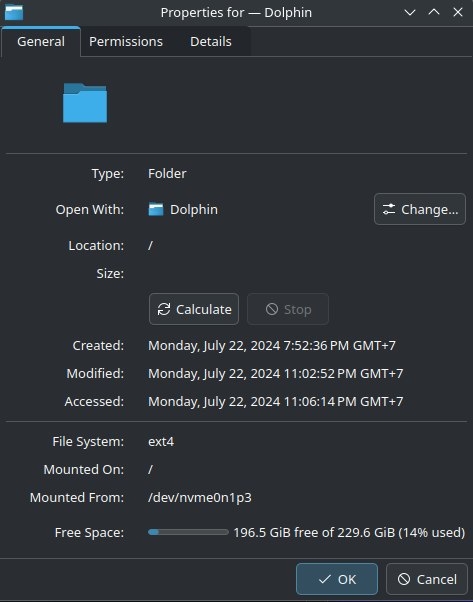
Maybe you have a swap file that happens to be 16GB ?
I only allowed 4G for swap, maybe arch enabled zram and it used 8GB by default and I actually don't need to create a swap partition?
Arch doesn't really do anything you don't tell it to do during installation.
That's the entire point. After installing Arch, you know what your system does, cause you configured it.
You can try using # du -h -d 1 / to locate the largest directory under /. Once you've located the largest directory, replace / with that directory. Repeat that until you find the culprit (if there is a single large directory).
EDIT (2024-07-22T19:34Z): As suggested by @DarkThoughts@fedia.io, you can also use a program like Filelight, which provides a visual and more comprehensive breakdown of the sizes of directories.
You can use Filelight which is much simpler and more visual.
But it doesn't make you feel like hackerman
goddamn does it ever feel good to feel like a hackerman
Agreed.
Df does that too, or did you mean du?
Whoops! You are correct — I have updated the original comment. I'm not sure why I wrote df instead of du. This is a good example of why one should always be wary of blindly copying commands 😜 It begins to teeter on being potentially disastrous if I had instead wrote dd.
Luckily the syntax wouldn't have worked if it was dd
You're a life saver I finally found the culprit
Do tell! We need a follow up :)
It's "Steam" inside .local eat up 6GB even though I have not open it yet and tmp files (almost 5GB) that is not clear itself after installing the OS
A fresh Arch install included Steam? Or was this not a fresh install?
I install it during pacstrap
Ah, I see. Just be aware that any additional file size when you get to the stage you can install KDE is pretty much considered the "bloat" part of installs, meaning you only make arch as bloated as you want after that. I like filelight in KDE https://apps.kde.org/filelight/
Or you could use baobab to do the same thing if you want an answer within 10 minutes.
Or dust if you want it fastest with a pretty graph
It might have something to do with the dolphin you're keeping in there.
?
Dolphins are quite large
But they’re faster than lightning.
Try the following command to list all installed packages sorted by size [source]:
LC_ALL=C.UTF-8 pacman -Qi | awk '/^Name/{name=$3} /^Installed Size/{print $4$5, name}' | LC_ALL=C.UTF-8 sort -h
There may be some unexpectedly large packages installed.
Keep in mind that a part of the filesystem will be reserved on creation. Here if I create a completely empty ext4 filesystem with:
truncate -s 230G /tmp/img
mkfs.ext4 /tmp/img
mount /tmp/img /mnt
Dolphin reports "213.8 GiB free of 225.3 GiB (5% used)"

Try running pacman -Scc to get rid of the pacman cache.
Also: How did you install KDE?
I used "sudo pacman -S plasma sddm"
ncdu /
sounds ok for me if you install the full KDE Plasma + all applications package group and add some basic software like LibreOffice
I used minimal plasma (pacman -S plasma)
plasma-desktop is the minimal one.
use plasma-desktop, that's the actual minimal one.
Whether you're a seasoned pro or the noobiest of noobs, you've found the right place for Linux support and information. With a dedication to supporting free and open source software, this community aims to ensure Linux fits your needs and works for you. From troubleshooting to tutorials, practical tips, news and more, all aspects of Linux are warmly welcomed. Join a community of like-minded enthusiasts and professionals driving Linux's ongoing evolution.