92
Did this happend to anyone else?
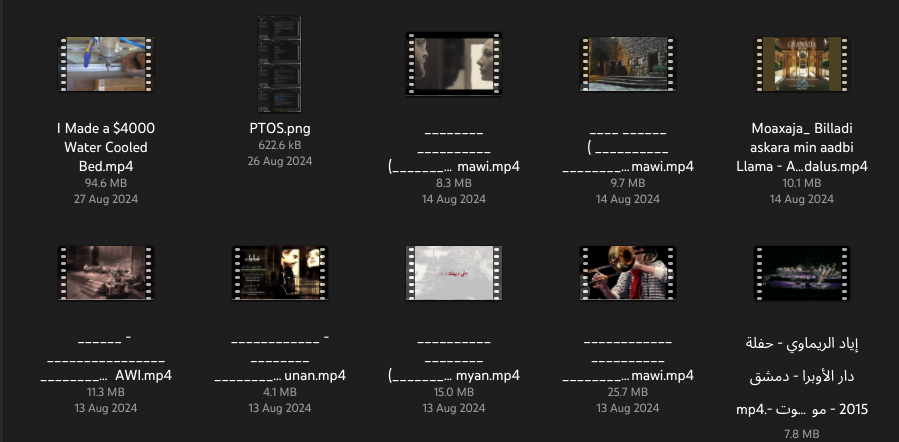
Maybe the target filesystem doesn't support those filenames. I think I saw that either with NTFS or SAMBA. Really annoying.
Is that a limitation of the destination filesystem?
There's an Arabic name in the bottom right. Likely the software getting confused.
The filename ending left to right despite the file being right to left is kinda funny
That's exactly how it's supposed to be handled.
It's been a long time since I've had to deal with text rendering, so forgive me if this question is silly or uses wrong terminology:
Are the unicode LTR/RTL markers part of the filename or is the display layer supposed to figure it out by the codepoints used?
Correct
Can you check in a terminal? If you can see them in the terminal and not in the desktop you're missing a font. If you can't see them in the terminal then you've somehow mangled them. What was the OS and filesystems you copied from?
Unless the font if the terminal has the same issue
Never noticed that? How do you copy them, from terminal? What software do you use? What file system do you use?
nautilus, ext4
I cannot reproduce it, I just tried to copy some files with various methods but they always end up correctly named. The only difference is that I have Btrfs. I never encountered this issue when I was using ext4 though.
Can't reproduce it on ext4, KDE Plasma too.
Are you copying it to a locally mounted ext4 or is it a network share of an ext4 drive, and if so - what type of network share?
Could be a bug in Nautilus though it's so mature now that would be strange. I'd report it to their repo (don't have the link and I'm on my phone but it should be easy to find).
ext4 supports various filename encodings (simultaneously, even!) but sometimes when you copy a file from one destination to another in a batch with mixed encodings you can end up with situations like this. Especially from within a GUI.
Does the problem occur when you copy each file one by one or only in batch?
This happened when copying in batch.
From Wikipedia, the free encyclopedia
Linux is a family of open source Unix-like operating systems based on the Linux kernel, an operating system kernel first released on September 17, 1991 by Linus Torvalds. Linux is typically packaged in a Linux distribution (or distro for short).
Distributions include the Linux kernel and supporting system software and libraries, many of which are provided by the GNU Project. Many Linux distributions use the word "Linux" in their name, but the Free Software Foundation uses the name GNU/Linux to emphasize the importance of GNU software, causing some controversy.
Community icon by Alpár-Etele Méder, licensed under CC BY 3.0