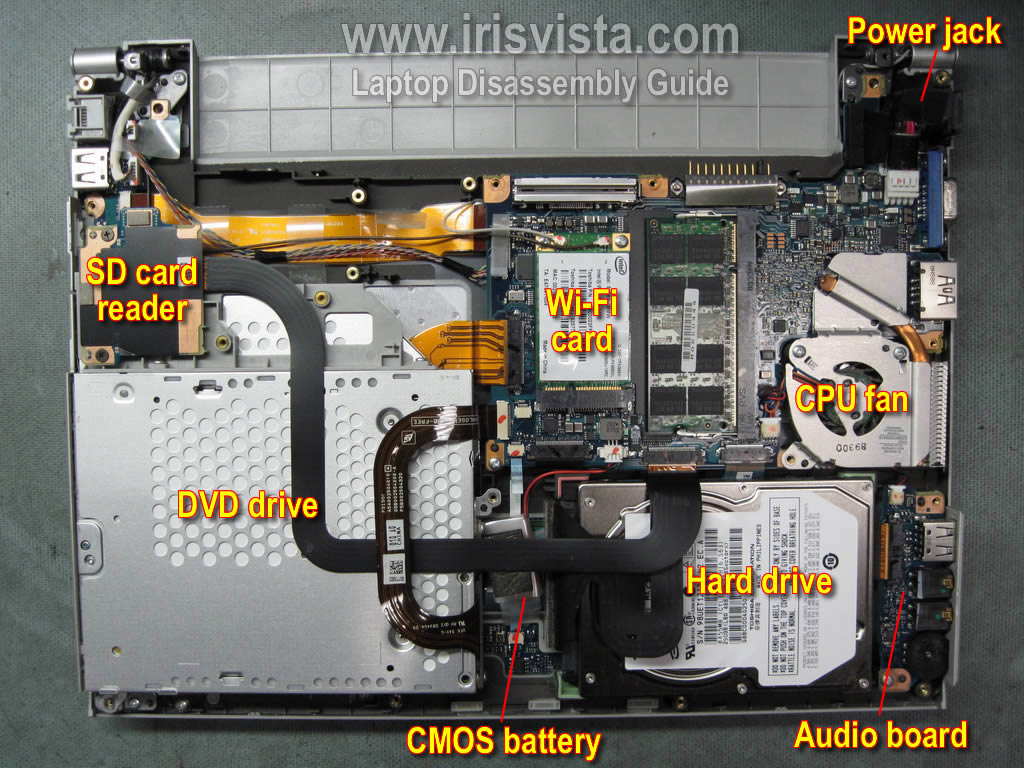
I put some new RAM into a Portege R700 and had the same issue. Solved by removing and reseating the RTC battery.
Do you still remember the steps?
I now unplugged the white plug with the red/black cable as can be seen here (above and to the right of the CMOS battery), then put the RAM stick in, waited a few minutes, plugged it back in, reassembled - but the symptoms are still the same: no error message (some LEDs are supposed to blink in a certain way when it's incompatible), just high fan, dead screen, not even a cursor blinking.
My notes only say "Upgraded RAM 2->4GB (had to reset RTC)". There is a good chance I left it unplugged and RAM-less for quite a while as I tend to multi-task and get distracted. A few minutes should be fine though. Just compared the specs of the R600 v R700 and I've got 2 slots and no on-board so that probably makes a big difference. Sorry can't be more help, but there must be a solution. https://www.productindetail.com/pn/dynabook-toshiba-portege-r600-102 https://www.productindetail.com/pn/xvw-dynabook-toshiba-portege-r700-15v-2
Thanks!
I've about had it with this one. Maybe it will come handy at some point even with just 1G of RAM.
I suppose it could be bad RAM modules, dirty contacts, dodgy slot. Can you boot it with a Memtest USB stick (empty or filled slot)? (If you find yourself in London look me up, this is exactly the sort of thing I'd get obsessed with fixing)
Thanks, but I'm in Finland.
I'll have to fire up another machine for the memtest.
Will report back evtl.
Yup that's PC2-6400, says so on the label. S is SODIMM, the physical form factor. (That is, the little laptop size sticks, desktop sticks are like twice as wide.) Should be compatible.
Since you've got two of them, I'd try plugging them in in different configurations. The working one in slot 1, the new one in slot 2, the other new one in slot 2; both new ones; each new one in slot 1 and the working one in slot 2.
Maybe also try just letting it sit there for a few minutes. Some systems need extra time when the hardware configuration changes.
I don't suppose you could find any bios updates by any chance
Maybe also try just letting it sit there for a few minutes. Some systems need extra time when the hardware configuration changes.
Trying this next.
I don’t suppose you could find any bios updates by any chance
Not immediately but it could be lost in the depths of the internet somewhere...
I waited for half an hour, nothing happened.
I scoured the internet for a BIOS upgrade but what little I found might or might not be the right file, and flashing it is not a trivial task (no Windows!).
It runs something called ACPI BIOS 3.20, and it is impossible to find it under that name.
It does run acceptably on AntiX though, fwiw.
You should be able to boot freedos and flash it from there, assuming it's an exe.
I'd still try the different combinations.
Sorry, there's only 1 slot, I already tried the 2 different combinations.
yes, Freedos, and I have some exe file but it says it's a Windows exe... meh, when I feel like it.
Oh, your post said one spare slot. I don't know how else you'd get to 5gb other than 4+1, because I've never seen a 3 or 5gb stick of RAM.
But it may just not be "toshiba compatible". Maybe see if you can find some Toshiba branded DDR2.
Do-It-Yourself, Repairs and Fixes
Share tips and tricks to keep people from throwing out that broken item. Repair before replace!