1
submitted 7 months ago by Toralv@lemmy.world to c/openwrt@lemdro.id

So I was messing around a bit with nginx on my openwrt one router, nothing that should've affected uHTTPd but now I don't get redirected to the LuCI web interface from 192.168.1.1/

I've stopped and disabled nginx, checked the configs and I can't find anything out of the ordinary, maybe I'm blind.

cat /etc/config/uhttpd:

config uhttpd 'main'
	list listen_http '0.0.0.0:80'
	list listen_http '[::]:80'
	list listen_https '0.0.0.0:443'
	list listen_https '[::]:443'
	option redirect_https '0'
	option home '/www'
	option rfc1918_filter '1'
	option max_requests '3'
	option max_connections '100'
	option cert '/etc/uhttpd.crt'
	option key '/etc/uhttpd.key'
	option cgi_prefix '/cgi-bin'
	list lua_prefix '/cgi-bin/luci=/usr/lib/lua/luci/sgi/uhttpd.lua'
	option script_timeout '60'
	option network_timeout '30'
	option http_keepalive '20'
	option tcp_keepalive '1'
	option ubus_prefix '/ubus'

config cert 'defaults'
	option days '397'
	option key_type 'ec'
	option bits '2048'
	option ec_curve 'P-256'
	option country 'ZZ'
	option state 'Somewhere'
	option location 'Unknown'
	option commonname 'OpenWrt'

Should I look anywhere else? I can live with this but I would really like to know the reason for the change.

Maybe it's worth mentioning that I ran chmod -R 777 /www and maybe that's the cause? I reverted it to 755 but no change. I don't see how that would affect it either way though.

[-] Toralv@lemmy.world 3 points 1 year ago

I truly understand this sentiment, and if I ever find it troublesome to maintain, I will do just that, but right now I just want to use this as an excuse to fiddle around haha ;). I don't run anything high-profile and my server uptime is still on par with the frequent power outages in my area

[-] Toralv@lemmy.world 3 points 1 year ago

I see, very nice. That would reduce the cost quite a bit. Thank you

[-] Toralv@lemmy.world 3 points 1 year ago

I forgot VM's completely, that's very true.

[-] Toralv@lemmy.world 4 points 1 year ago

My router physically burnt up, up in flames. No idea why, tired of life I guess.

[-] Toralv@lemmy.world 3 points 1 year ago

This was my first thought. I have some experience with iptables so I think this would be doable. Thank you

[-] Toralv@lemmy.world 7 points 1 year ago

Ah I see, did not think of that. A network card with two ports would be enough right? One for the modem, and the other for clients, which ideally could be a switch, for more ports. That's possible right?

[-] Toralv@lemmy.world 3 points 1 year ago

Ah okay. Thank you for the reply.

Just to double check, would anyone be so kind and send a screenshot of any GTK application? (where the change is apparent) I'm pretty sure something is wrong with my font configuration because what I'm seeing isn't pretty.

12
submitted 1 year ago by Toralv@lemmy.world to c/archlinux@lemmy.ml

Updated earlier today and some of the packages were gtk, adwaita and related. Is it just me or did anyone else notice this?

[-] Toralv@lemmy.world 10 points 2 years ago

That’s a very nice cat

1
submitted 2 years ago* (last edited 2 years ago) by Toralv@lemmy.world to c/projectzomboid@lemmy.world

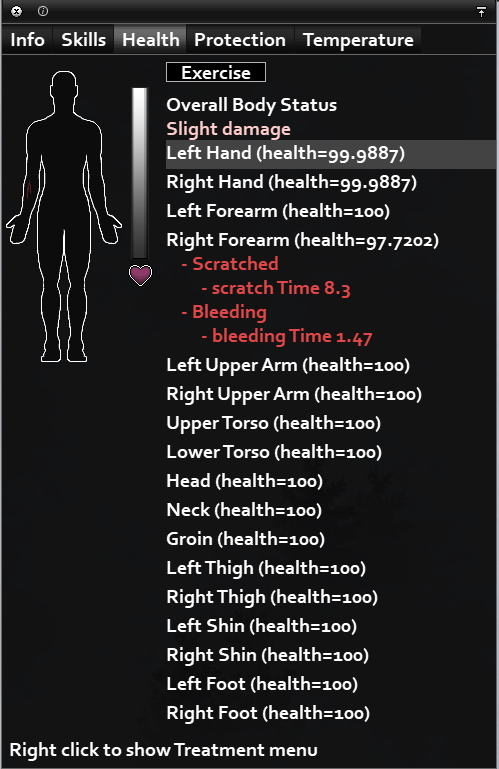
In multiplayer I can't see the same options as in singleplayer. Attached image is from SP. In multiplayer, I can't see e.g. "bleeding Time 1.47".

In the multiplayer world, I have a fracture and I really want to know when it has finished healing. So far it has been 20 days.

I've tried granting admin access level, but the second I enable admin, all my complications gets automatically healed.

Any ideas? I don't mind looking in files/databases, if that's what it takes. Any comment is appreciated!
[-] Toralv@lemmy.world 3 points 2 years ago* (last edited 2 years ago)

I found a solution. Thanks for pointing me in the right direction. I've edited my post with the solution.

[-] Toralv@lemmy.world 3 points 2 years ago

Looks like I have all the required entries, mine looks mostly the same as yours.

[-] Toralv@lemmy.world 3 points 2 years ago

Well yes. I've tested several different icon themes, but they all have the same problem

27
submitted 2 years ago* (last edited 2 years ago) by Toralv@lemmy.world to c/linux@lemmy.ml

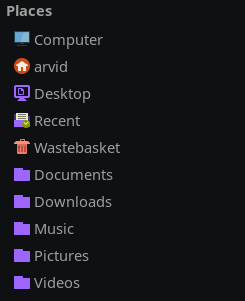
Running debian+swaywm and I'm trying to find a file manager that I like.

What I've have tested so far is using another icon theme.

Edit:

Following this thread fixed it for me. I didn't notice any immediate change, but after reboot, the correct icons appeared. I think this mainly had do to with me not having the xdg-user-dirs-gtk package.
[-] Toralv@lemmy.world 4 points 3 years ago

Damn you're right. I may or may not have been brushing off anything related to gnome, since I thought it wouldn't apply to me... Well that was ignorant of me.

While this doesn't seem to apply for spotify, steam or discord, after rechecking on my laptop with Ubuntu, neither did it there... (so my description is a little off). I guess that's because of the applications not running wayland natively? I actually don't really know though.

I know in Windows there is an option to turn off all animations, and it really did that for EVERYTHING, so I guess I'm after something like that, but there probably isn't such an option.

23
submitted 3 years ago* (last edited 3 years ago) by Toralv@lemmy.world to c/linux@lemmy.ml

On Ubuntu (and probably other distros as well) it's as easy as going to Settings>Accessibility>Reduce animations and then turning it ON. This seems to apply to most applications, like firefox, ~~discord and spotify~~.

Is there any way to do this on swaywm? I thought maybe it could be set with an environment variable, but couldn't find any. My linux knowledge ain't the best.

This is my system: https://imgur.com/MhJe9qg

view more: next ›

Toralv

0 post score
0 comment score
joined 3 years ago