[-] promitheas@programming.dev 12 points 1 month ago

One is mouser.com, ive bought stuff from them in the past. Theres a couple more Ive got bookmarked at home, Ill either update or reply with them later

[-] promitheas@programming.dev 9 points 4 months ago

Yes. I think ill start replying "Yes, I thank Satan, my one and only true God" just to see the horror on their faces

[-] promitheas@programming.dev 12 points 5 months ago

By sterile do you mean unable to have kids? Because i seem to remember in the clone wars series there were examples of clones with families. I may be wrong though since its been a few years since ive watched it

[-] promitheas@programming.dev 10 points 6 months ago

Do people still seriously consider travelling/engaging with the US in any way??

[-] promitheas@programming.dev 10 points 8 months ago

Wouldnt a true anarchist explicitly NOT do nothing? Theyd actively (keyword: actively) do what they could to resist, no?

[-] promitheas@programming.dev 11 points 8 months ago* (last edited 8 months ago)

Not sure if this is something you already found, but I found this from the service manual

Im very much a beginning hobbyist, so I cant make much from this, but I hope it puts you on the right path to an answer.

Here the link to the manual:

https://manualmachine.com/kenwood/ka3020se/2350744-service-manual/

[-] promitheas@programming.dev 11 points 8 months ago

If you look at the source page for tge section on US fascism it has a section on the current state of affairs

[-] promitheas@programming.dev 9 points 11 months ago

"Why should we give them back? We managed to steal them so they were obviously not safe in your hands. No, no, we'll keep them here for safe keeping."

89
13
submitted 2 years ago* (last edited 2 years ago) by promitheas@programming.dev to c/linux@lemmy.ml

Hello everyone! I recently decided to reignite my passion for learning about kernel development, so I printed out the third edition of Linux Device Drivers by J. Corbet + others. In the book it is stated that they assume you have the 2.6.10 kernel. I decided to set up a virtual machine using virt-manager so that I can work through most of the book (I realise VMs dont allow for many things when developing drivers, where physical access to hardware is required, but its the best option for now until I can get a RPi or something else).

I decided to go with Ubuntu Dapper Drake, as it has a kernel version pretty close to what is used in the book, so I figured there wouldn't be much friction when trying to install the specific 2.6.10 version (Dapper Drake is on 2.6.15, at least the one I got). However, I am encountering an issue with my networking. I have set up the NAT bridge from my regular WIFI internet connection to my virtual machines, set my dapper drake installation to use that in the NIC settings, but it doesnt connect.

Here are some commands and their output from the guest OS:

$ ifconfig -a
lo
<loopback information yada yada>

sit0
<yada yada>

$ lspci | grep -i ethernet
0000:01:00.0 Ethernet controller: Unknown device 1af4:1041 (rev 01)

The second command's output leads me to believe that a device is detected but the OS doesnt know what to do with it because I dont have the virtio drivers for networking installed.

I've searched everywhere for a way to download them either as source or as a .deb package so I can transfer them to the guest OS using a disk drive I will create, but I cant find them anywhere. Everywhere I look, everyone says that for linux they are already included in the kernel (might not be true for the distribution I have as a guest).

So here is my question(s) finally: Where can I find virtio-tools either as a .deb package or as source with instruction to build on a distribution of around the age of dapper drake, or if there is another way and I am wrongly fixated on this, how can I set up networking by passing through my regular internet from the host to the guest, so that I can use stuff like github to write the driver code on my host and easily transfer it to the guest for compilation/testing?

Please be gentle. Dapper drake released around 2006 and it wasn't until 2016 when I first used linux in any form, so I am used to a little more quality of life in my distributions xD /j

As always, many thanks in advance to everyone taking time to answer :)

[-] promitheas@programming.dev 11 points 2 years ago

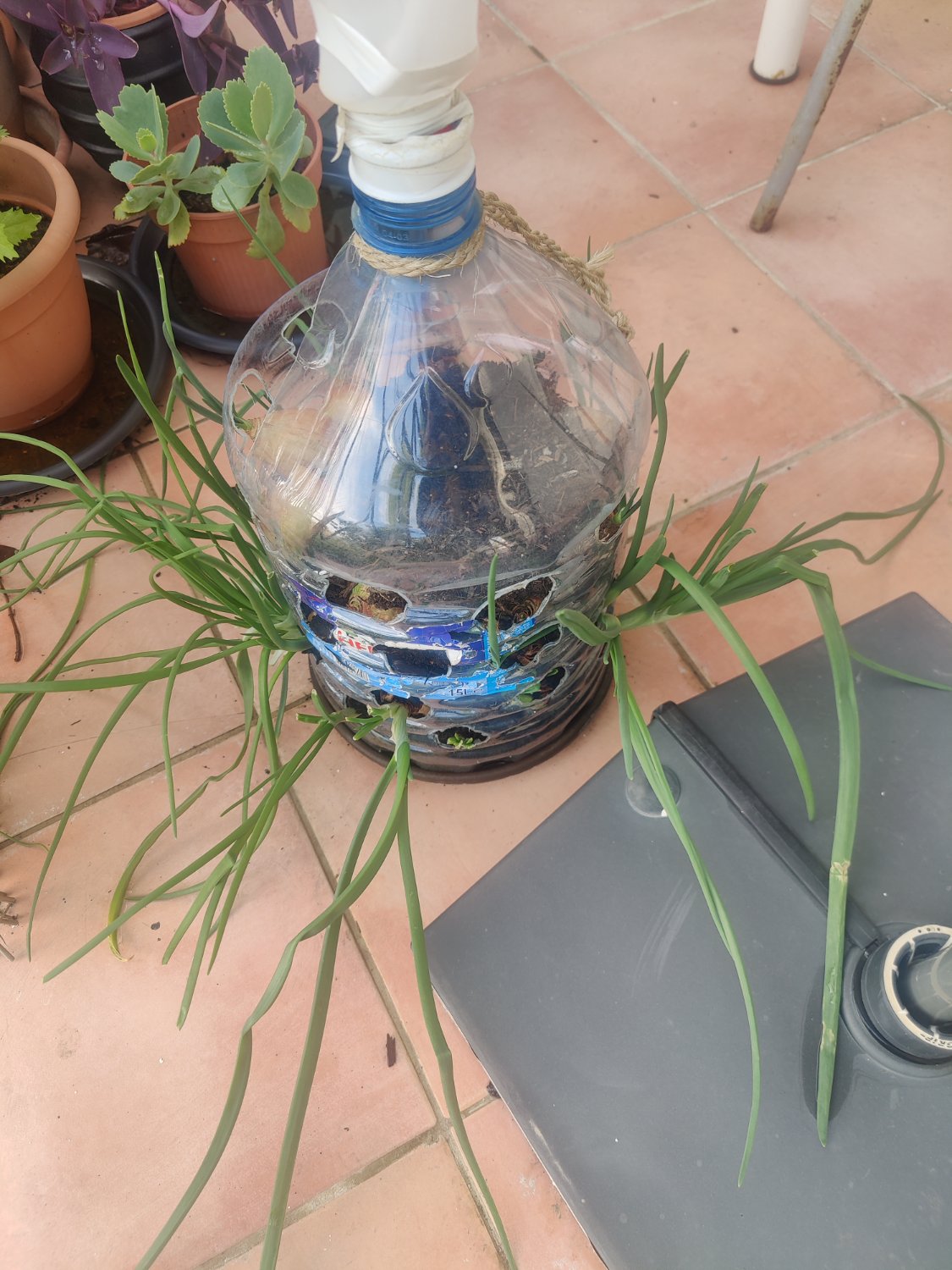
Genuine question, not at all an attack, but what would the difference be between this and a regular plastic plant pot?

56
86
23
submitted 2 years ago* (last edited 2 years ago) by promitheas@programming.dev to c/steam@lemmy.ml

Hello everyone! I have this issue with my steam on arch linux where it takes about 5 minutes and sometimes more to start, then I keep getting connection errors when trying to sign in. Ive opened an issue on the github page you can read for more details (logs etc)

Basically now I'm wondering if I should just reinstall steam and see if that fixes it. Here is the situation though. I have a steam library in my /home partition, as well as on a separate hard drive which is always mounted. I have copied the steamapps directory from the home side of things to a temporary location, so I assume if I reinstall and copy it back I should have all my games and stuff set up exactly as they were before the issue? Also, do I need to backup the steamapps directory from the hard drive which is separate to /home?

The reason I'm so hesitant to just wipe everything and reinstall, is because I spent a good couple of weeks trying to get Silent Hunter 3 set up with steamtinkerlaunch, and even on release it was quite a finnicky game, let alone 20-something years later on linux running through proton, and now I have it at a point where it works.

Anyway, I would love some help, so thanks in advance!

P.s. Updating system didn't solve issue

Just checked, and I have all the dependencies listed on the package page satisfied in some form. Now, whether some version is slightly outdated, I don't know how to check

Reinstalling steam doesn't seem to fix the issue.

pacman -R steam-native-runtime steam
pacman -S steam

When launching from the terminal again I get the same output. The 2 lines that stand out are the following:

src/clientdll/steamengine.cpp (2773) : Assertion Failed: CSteamEngine::BMainLoop appears to have stalled > 15 seconds without event signalled

Any ideas how I can troubleshoot this?

[SOLUTION] I had to run

pacman -Syu steam

which seems to have also installed a package called lsb-release

Im not sure why running a full system upgrade and also uninstalling and reinstalling steam didn't also grab this package when I did those, but there you go. I do a full system update by simply running yay as to my understanding that is the same as running yay -Syu but it first runs pacman -Syu. If anyone could provide some insight into why that might be I would appreciate that so I can learn from this experience. Thanks again everyone who tried to help!

[-] promitheas@programming.dev 10 points 2 years ago

Is it weird that i dont want to be remembered? I just want to fade into nothingness. None of it matters anyway

17
submitted 2 years ago* (last edited 2 years ago) by promitheas@programming.dev to c/archlinux@lemmy.ml

Hello guys!

I want to completely remove qemu and all its optional packages. I went about removing most of them, but now I have this list of packages still installed:

$ pacman -Q | grep qemu
qemu-base 9.1.2-1
qemu-common 9.1.2-1
qemu-img 9.1.2-1
qemu-system-x86 9.1.2-1
qemu-system-x86-firmware 9.1.2-1

If I try to remove them with pacman -R <list of those package> I get the following message:

checking dependencies...
error: failed to prepare transaction (could not satisfy dependencies)
:: removing qemu-base breaks dependency 'qemu' required by libguestfs
 -> exit status 1

When I add libguestfs to that list, I get the following output:

pacman -R qemu-base qemu-common qemu-img qemu-system-x86 qemu-system-x86-firmware libguestfs
checking dependencies...
:: e2fsprogs optionally requires lvm2: for e2scrub
:: grub optionally requires dosfstools: For grub-mkrescue FAT FS and EFI support
:: grub optionally requires lzop: For grub-mkrescue LZO support
:: grub optionally requires mtools: For grub-mkrescue FAT FS support
:: htop optionally requires strace: attach to a running process
:: libblockdev-fs optionally requires btrfs-progs: for BTRFS filesystem support
:: libblockdev-fs optionally requires dosfstools: for VFAT filesystem support
:: libblockdev-fs optionally requires exfatprogs: for exFAT filesystem support
:: libblockdev-fs optionally requires f2fs-tools: for F2FS filesystem support
:: libblockdev-fs optionally requires nilfs-utils: for nilfs filesystem support
:: libblockdev-fs optionally requires xfsprogs: for XFS filesystem support
:: libvirt optionally requires lvm2: Logical Volume Manager support
:: libvirt optionally requires qemu-base: QEMU/KVM support
:: mkinitcpio optionally requires lzop: Use lzo compression for the initramfs image
:: reflector optionally requires rsync: rate rsync mirrors
:: steamtinkerlaunch optionally requires rsync: optional for backing up steamuser files from proton games
:: steamtinkerlaunch optionally requires strace: write a strace log of the launched game
:: udisks2 optionally requires btrfs-progs: for BTRFS support in libblockdev-fs
:: udisks2 optionally requires dosfstools: for FAT support in libblockdev-fs
:: udisks2 optionally requires exfatprogs: for exFAT support in libblockdev-fs
:: udisks2 optionally requires f2fs-tools: for F2FS support in libblockdev-fs
:: udisks2 optionally requires nilfs-utils: for NILFS support in libblockdev-fs
:: udisks2 optionally requires xfsprogs: for XFS support in libblockdev-fs

Packages (50) augeas-1.14.1-3  btrfs-progs-6.11-1  capstone-5.0.3-1  debootstrap-1.0.137-1  distro-info-1.10-1  distro-info-data-0.63-1  dosfstools-4.2-5  dtc-1.7.2-1  edk2-ovmf-202411-1  exfatprogs-1.2.6-1  f2fs-tools-1.16.0-3  gptfdisk-1.0.10-1  hivex-1.3.23-10
              iniparser-4.2.4-1  jfsutils-1.1.15-9  libewf-20140816-1  libldm-0.2.5-3  libslirp-4.8.0-1  libtraceevent-1:1.8.4-1  libtracefs-1.8.1-1  libxdp-1.4.3-1  lrzip-0.651-3  lsscsi-0.32-2  lvm2-2.03.28-1  lzop-1.04-4  mtools-1:4.0.46-1
              multipath-tools-0.10.0-1  ndctl-79-1  nilfs-utils-2.2.11-1  perl-libintl-perl-1.33-4  rsync-3.3.0-2  seabios-1.16.3-1  sleuthkit-4.12.1-3  squashfs-tools-4.6.1-2  strace-6.12-1  supermin-5.3.5-1  sysfsutils-2.1.1-2  syslinux-6.04.pre3.r3.g05ac953c-3
              thin-provisioning-tools-1.1.0-1  vde2-2.3.3-5  virtiofsd-1.13.0-1  wolfssl-5.7.4-1  xfsprogs-6.11.0-1  yara-4.5.1-1  libguestfs-1.54.0-1  qemu-base-9.1.2-1  qemu-common-9.1.2-1  qemu-img-9.1.2-1  qemu-system-x86-9.1.2-1  qemu-system-x86-firmware-9.1.2-1

Total Removed Size:  208.05 MiB

:: Do you want to remove these packages? [Y/n] n
 -> exit status 1

I'm seeing stuff in there about grub and some other packages I definitely DO NOT want to remove, so I'm wondering how I can proceed.

Thanks in advance!

13

Hello everyone!

So I installed BetterF3 using their .jar all-in-one installer and tweaked some of the settings to get my F3 to look how I want it, but after when I installed Complementary Shaders using their all-in-one .jar installer, it created a separate Iris & Sodium option in my minecraft launcher. I didnt think much of it as it is also installing fabric, so I thought my BetterF3 mod in my .minecraft/mods directory would be loaded automatically, but thats not the case.

The game looks amazing with the shader so I want to keep that on, but I also want my nice looking F3 menu back. How can i do that?

Thanks in advance!

P.s. In the image I attached, 1 is the fabric installation made with the BetterF3 installer, and 2 is the one made with the Complementary Shaders installer.

31
submitted 2 years ago* (last edited 2 years ago) by promitheas@programming.dev to c/linux_gaming@lemmy.ml

[SOLUTION AT END OF POST]

Hello again. A few days ago I made the post in the link above which is about getting Silent Hunter 3 working with the LSH3 megamod, and I got a great answer in there to use steamtinkerlaunch to run separate executables just once (e.g. to install JSGME mod manager and to install the actual megamod LSH3).

After playing for a bit I decided I want a little more control over what mods are installed, and decided to switch to the GWX megamod, so I completely uninstalled SH3 and its folder in the steamapps/common folder, and reinstalled it cleanly. Then using wine I ran the 4GB patch so that the game would use 4GB instead of 2GB memory which is required for running many mods. The memory usage can get quite high. After that I loaded all my desired mods with JSGME.

The game starts fine, and I can do all the training missions and the single missions, but I cant start a campaign. After the loading bar for entering a campaign patrol fills up, there is a delay of a couple minutes (normal for GWX as during that stage it is loading all its mods and any other mods you have enabled), and then crashes to desktop. This clearly means that it is running out of memory while loading mods. However after running the patcher to increase the memory limit of the executable I get a new sh3.exe file and my original gets renamed to sh3.exe.Backup, which seems to show that the patch has been applied correctly.

Could anyone help me diagnose this issue please?

Thanks in advance!

Edit 1 (SOLUTION): So what ended up working for me was simply making the game run using proton 6.3-8. I did try version 4.3 as well, but that didnt seem to be working that well with the widegui mod I have. Thanks to all who gave suggestions!

Edit 2: Editing to add 2 more things to the solution. Because of frequent crashes while in the career patrol, I ended up lowering the Particle Density to 90 and also do not create any saves while out on patrol. Not sure which of the two actually stopped the crashing, but so far I've played for about 20 hours with no crash.

23
submitted 2 years ago* (last edited 2 years ago) by promitheas@programming.dev to c/linux_gaming@lemmy.ml

Hello guys! Recently re watched Das Boot (amazing film btw for those who haven't seen it, highly recommend) and that inspired me to install my SH3 from steam. The thing is its the first time I'm going to be playing on Linux, and I'm a bit stumped on how I can install the LSH3 supermod. The instructions for the 2022 version of LSH3 state that you simply run the provided .exe (due to this being steam proton I placed it in the game directory but this doesn't seem to be required) and run it. However I can't seem to figure out how I can use an existing proton environment to run an executable which is not the actual steam game for that environment. Can anybody help with this?

As a bonus question, because this game is quite old there are quite a few mods available for it, and the best way to activate them after downloading (on windows at least) is through JSGME. However I also cant figure out how to install that in the game directory. I have downloaded its installer but dont know how to actually run it.

I have included the link to the LSH3 2022 install manual as well as a screenshot of my game directory with files related to this post circled.

Any insight would be amazing!

8
submitted 2 years ago* (last edited 2 years ago) by promitheas@programming.dev to c/eveonline@lemmy.world

Hey everyone. Im trying to get into wormhole pvp as a hunter, and today I spent pretty much all day going down a chain with no explorers sited. I even spent a few hours camped at the wormhole to a HS system 4 or so jumps from Jita. The only people I saw were a few capsules, some cruisers in a fleet (probably defending their home), and a buzzard. I would jump to my perches on any relic or data site often, but there was no one. Am i doing something wrong?

Thanks!

25

Hello everybody! My brother plays Insurgency Sandstorm a lot and I wanted us to be able to play together, so I got it and after some messing about got it working on my system. One of the things I read in forum posts to do to get it to work on an Arch based system is to install glibc-eac-bin which has some patches to make certain games work (I hope I understood that correctly).

Today when I try to update my system I get the following message and it will not allow me to continue:

:: Starting full system upgrade...

resolving dependencies...

looking for conflicting packages...

:: glibc-2.40+r16+gaa533d58ff-1 and glibc-eac-bin-2.40-1 are in conflict. Remove glibc-eac-bin? [y/N]

I dont want to remove glibc, but i want the message to go away and to be able to proceed with my updates. Any suggestions on what I should do?

Thanks in advance

1
Creating (adding) POIs (programming.dev)
submitted 2 years ago* (last edited 2 years ago) by promitheas@programming.dev to c/osmand@lemmy.ml

I would like to contribute to the maps for my area by creating and uploading various POIs as I come across them in my daily use. To get familiar with the system I decided to add a known to me florist. I found the exact location using google maps, opened it in OsmAnd+, and went through the process to add all its details (address, phone, website, type, etc). However when I decide to upload it, signing in with username and password, I get the error in the image attached. Anyone know what the problem is and how I can solve it?

Edit: App Info OsmAnd+ 4.6.12, Released: 2024-01-16

[-] promitheas@programming.dev 9 points 2 years ago

God I wish she'd finished the republic/imperial commando series. The only reason i dont read it once every year is because it hurts too much to know that theres no new book to round it out and complete it.

[-] promitheas@programming.dev 10 points 2 years ago

Its a joke from a new game. Look into Helldivers 2 and the satire of it related to how totalitarian governments use phrases like "managed democracy" and "freedom" to braniwash their populace into doing whatever they want. Great game too

view more: ‹ prev next ›

promitheas

0 post score
0 comment score
joined 3 years ago