167
submitted 1 month ago by grant@toast.ooo to c/canvas@toast.ooo

https://canvas.fediverse.events/

Canvas is a collaborative pixel canvas for the Fediverse! It's live until July 20th @ 4am UTC!

Socials

all 31 comments
sorted by: hot top new old
[-] BlueEther@no.lastname.nz 29 points 1 month ago* (last edited 1 month ago)

It is either do the canvas or sit on the beach, winter camping with the kids, eating fresh mussels in butter and garlic

Sorry @grant@toast.ooo

Edit: sunset. Yes that is an active volcano in the middle

[-] grant@toast.ooo 9 points 1 month ago

Honestly that looks great 🏝️

Enjoy your vacation!

[-] synapse1278@lemmy.world 11 points 1 month ago* (last edited 1 month ago)

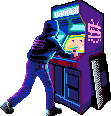
Everyone is welcome in the Synthwave X Chiptune team to collaborate on the LukHash Home Arcade template !

[-] mindbleach@sh.itjust.works 8 points 1 month ago

Seeing cursors is instantly gross. Is mine transmitted by default? Is there an option to not do that? Is it distinct from seeing other people's?

[-] grant@toast.ooo 20 points 1 month ago

you can turn off the cursors in the settings panel

plus when you turn off the cursors, it'll stop sharing yours ✨

[-] Ategon@programming.dev 13 points 1 month ago* (last edited 1 month ago)

In addition to what grant said. Cursors dont show and arent sent when logged out or when on mobile and are anonymous so people can't tell whos cursor is who. Just a fun thing to add some activity to the canvas and make it feel more like a community instead of you placing pixels into a void

[-] NaibofTabr@infosec.pub 3 points 1 month ago

Cursors dont show and arent sent when logged out

Er, on that note, where is the logout option?

[-] Ategon@programming.dev 2 points 1 month ago* (last edited 1 month ago)

theres no button for it atm. you get auto logged out after awhile though. For disabling it while logged in theres the toggle in settings

[-] blued_gear@fedia.io 8 points 1 month ago

Attention everyone, make sure to set the coordinates of the template image to 0,0 when using Cotemplate. Multiple people already started drawing with offset because of this.

[-] mesamunefire@piefed.social 6 points 1 month ago
[-] ProdigalFrog@slrpnk.net 6 points 1 month ago* (last edited 1 month ago)

Thanks for creating and hosting all this, my instance has been having a lot of fun with it :)

[-] grant@toast.ooo 5 points 1 month ago

no problem :) it's always a blast running this event

[-] matelt@feddit.uk 5 points 1 month ago
[-] kokomo@reddit.kokomo.cloud 4 points 1 month ago* (last edited 1 month ago)

https://canvas.fediverse.events/share/153,407/z=4.600807673138737 This was really awesome to build this penguin, props to everyone involved :D Club penguin forever!

[-] inlandempire@jlai.lu 4 points 1 month ago

I'm still confused if I should wait to have 6 mixels and place them in batches, or place whenever a new pixel is available, my gut feeling tells me one every 30 seconds is more efficient?

[-] JRaccoon@discuss.tchncs.de 3 points 1 month ago

It doesn't matter whether you place 1 pixel every 30 seconds or 6 every 3 minutes. One thing to keep in mind tho is that the 30 second timer seems to reset every time you place a pixel. For example, if you're at 0 pixels, gain 1, wait 15 seconds, and then place it, you'll still have to wait another 30 seconds for the next pixel. Meaning you basically lost 15 seconds. So I think the most efficient strategy is to place all 6 pixels as soon as you gain the 6th one.

[-] grant@toast.ooo 4 points 1 month ago

this has been fixed, you no longer have to time your pixels out!

if you place pixels mid-countdown, it will still keep the 15s (or what it was at) until the next pixel

cc @inlandempire@jlai.lu

[-] inlandempire@jlai.lu 3 points 1 month ago* (last edited 1 month ago)

I think my confusion was that the cooldown would add 30s on top of the existing cooldown per pixel so i'd end up thinking i had to wait 180s for a 6th pixel, but now it shows 30s every time, thank you for the fix!

[-] inlandempire@jlai.lu 3 points 1 month ago

Oh okay makes sense, thank you!

[-] emb@lemmy.world 3 points 1 month ago* (last edited 1 month ago)
[-] synapse1278@lemmy.world 3 points 1 month ago

Did the server go down ?

[-] Wildone@sh.itjust.works 2 points 1 month ago

Whenever I try to place a pixel it just errors out "invalid pixel location. Are you even on the canvas?"

[-] grant@toast.ooo 5 points 1 month ago

i've come with some great news! i've fixed this issue and it's been deployed

cc @kaida@feddit.org

[-] Wildone@sh.itjust.works 2 points 1 month ago
[-] kaida@feddit.org 2 points 1 month ago

Thanks, sadly still doesn‘t work for Orion Browser on iPad

[-] grant@toast.ooo 2 points 1 month ago

interesting, what feature specifically isn't working? is it the same invalid pixel location, or is the site not functional?

also could you attach your iOS/iPadOS version and Orion version

[-] kaida@feddit.org 1 points 1 month ago

Yes it‘s the same ‚invalid pixel location, are you even on the canvas?‘. It‘s on iPadOS 26.5.2 and Orion Version 1.4.21 (1) (WebKit 8624.2.5.10.8)

[-] kaida@feddit.org 1 points 1 month ago

I have the same problem (using Orion browser on iOS)

[-] Ategon@programming.dev 1 points 1 month ago

What browser are you using?

[-] Wildone@sh.itjust.works 1 points 1 month ago
this post was submitted on 18 Jul 2026
167 points (98.8% liked)

Canvas

2511 readers
1 users here now

Canvas — A collaborative annual pixel placing event for the Fediverse!


Links

Atlas

https://2026.canvas-atlas.fediverse.events/

Timelapses

Organized by @grant@toast.ooo

founded 3 years ago
MODERATORS